Pollify: Real-Time, IRL Customer Feedback Device for Brick-and-Mortar Retailers [Tao Tao Final Project]

Introducing POLLIFY: An interactive, physical polling device to collect real-time customer input at brick-and-mortar retailers

Want real-time customer input on what products you should be stocking? Perfect for corner stores, restaurants, and other brick-and-mortar retail locations, Pollify provides insight on shopper preferences while making your customers feel like their opinions matter.

Pollify is an Arduino-powered product that leverages a TFT Touchscreen along with pushbuttons and LEDs. The physical form is designed to be large enough to catch customers’ attention, but small enough to be easily placed and secured in various locations around the store. We recommend placing multiple Pollify pop-ups at various locations around your store.

You can make your own Pollify pop-up by following my Instructables Tutorial.

Further notes on the physical form:

  • The physical form can contain an internal battery pack, or can be designed with an external power cord.
  • For retail locations, especially if placing away from a wall, not having to rely on plugging into a power socket can be helpful; the external power cord can also plug into an external battery pack (which can be secured in a way so as not to be stolen). This is one element that would required further R&D.
  • Additionally, the screen would benefit from being slightly larger for legibility, especially for anyone with trouble seeing up close.

Construction:

  • I built my two prototypes using foam board, and my final form with acrylic. I think acrylic suits the product well, and for overall look, the buttons should also be made of acrylic or a plastic material, rather than the clay I ultimately used. If the context were a kids store or classroom, then I would keep the clay buttons and also make the rest of the form out of clay or something that mimics its rounder texture. I adhered things together with either superglue or glue dots, which ended up being very handy for adhering pieces that I still wanted to be able to detach.
  • If I built this again, I would either (1) make an acrylic prototype and/or (2) be more vigilant (!!) about my measurements. I mis-measured the thickness of the acrylic, and this threw things off just the slightest. For designing instructions that could be exactly replicable, I would need to commit to certain specific measurements.
  • For future iterations, I would definitely need to work much further on the form and making sure it can be taken apart (for repairs, for switching the SD card, etc). The buttons in this final form aren’t easily removable (in fact, the superglue actually glued one of the buttons to itself, to the point it stopped working), which would need to be changed. It would also be great if the box pieces had grooves so that they fit snugly into each other.

Future Projections:

  • Similar to the Happy-or-Not product, I think the simplicity of Pollify could be its greatest strength. Would people use it? Maybe, maybe not. Maybe in some contexts, maybe not in others. Would the input they provided actually prove valuable to a business? Maybe, maybe not. But in an era where we’re always getting bombarded via email and web to fill out surveys and give feedback, a simple, one-question IRL device—and with a satisfying button!—could be a breath of fresh air.

Initial Product Sketches & References

Tao Tao: Final Project Ideas & Preliminary Lists

The final project approaches!! I must face my continued fear of arduino, coding, and all things technological.

I loved looking through past projects—so many cool inventions. Three of my favorites were:

  • Nigel’s Turn Off & Tune In rug (shuts off all devices so you can focus when you meditate)
  • Fortune Machine – prints out a fortune with fingerprint trigger
  • Location & Food Clock – shared clock with mom; shows school/work/traveling and student can alert phone as to whether they’ve eaten meals so mom knows <3 (I know my mom would loooooove this)

For my initial brainstorm, I thought about some of the tools and functions I saw in previous projects, and also considered projects I’ve worked on, or are currently working on, in other classes.

Idea 1: Interactive Two-Person Microphone

In 3DPD 1, I created this whimsical microphone designed for two people. Erica had the awesome idea of turning it into a working microphone as my final project. This would mean figuring out the audio (wireless? connected to a cord? I don’t actually know how microphones work??), and considering IoT possibilities — does something activate or upload? Does it make a sound when a certain word is uttered (think: birdsong, ice cream truck music, a fart noise…)

My ultimate goal with this microphone (name TBD — taking suggestions!) is to have something I can send to the guy behind Recess Therapy (an idea from Emma!). I think it would be so fun to see this microphone in action with kids in their interviews.

Prelim list of materials:
– Would I want to embed small microphones within mine to avoid having to build my own microphone?
– Would the foam material need to be something else (polyurethane?)
– I could build elements out of acrylic and wood
– This is honestly over my head

Idea 2: Household Chore Clock

Inspired by the Food & Location clock, this is a chore clock meant to track and serve as a (public) accountability mechanism for household chores, whether between family members or roommates.

Instead of times, there are chores (if a digital clock, these could be edited), such as clean bathroom and take out trash. These tasks would be synced with a digital spreadsheet, where tasks and periods of time are automated. The clock would also be linked to either an app or the same spreadsheet where participants confirm once they’ve completed their chore.

Prelim list of materials:
– Clock face, frame, and hands can be made from wood and/or acrylic
Servo motor
Adafruit Feather HUZZAH with ESP8266 WiFi
– An account on Adafruit IO
– An account on IFTTT
– Soldering equipment & wires

Idea 3: Bodega Prompt Machine
This concept is linked to a project I’m working on in our Climate Entrepreneurship class, which encourages more engagement with bodegas and bodega staff. It would involve either a fingerprint or motion sensor, and would dispense either: fun facts about the neighborhood or recommendations for local establishments, or fun facts or questions about the bodega staff. This would (ideally) prompt more interaction with the bodega staff and/or the local community and businesses—overall, helping learn more about your neighborhood.

Alternatively, Allan suggested chatting with a bodega owner and seeing what sort of IoT mechanism or device would be helpful to them in some aspect of running the bodega.

Look into:
Bodega whiteboards (people write down what they want)

Notes:
– Not at checkout (too crowded/busy) – somewhere else that still gets foot traffic
– What’s the purpose?
– QR code (how is that better than something on the wall?); survey for what products
– Why is it interactive?
– Product suggestions – digital replacement for whiteboard
– thermal printer no good (avoid this)
– machine would be a screen ($40 on Adafruit)
– User can send to SMS / submit a message; Adafruit-IFTTT can print to screen
– Could be simpler interactive, Choice A or B (buttons); could also be mini questions, surveys (do you want more of this? less of this? is it about the products in the store or local recommendations). One simple interaction
– This week’s poll: Which flavor of… do you want? Rotates every hour/day etc. Makes you feel like your bodega is listening to you. Can show products they already carry, but different flavor/size options. Maybe products they’re thinking of carrying. (Already have sales data.) Suggest something we haven’t listed? Scan this QR code.
– Mr Mango, Mr Coco, Mr Melon – one of these might have a whiteboard (all owned by the same Korean family)
– Buy Adafruit TFT – follow instructions/tutorial (Adafruit GFX Library). Maybe 3D print some caps for buttons.
BIG FUN-TO-PRESS BUTTONS

Final version is due: Tue, December 6 // Tue, December 13
Promoting project from Dec 6–13

Prelim list of materials:
– Wood for machine structure
– Miniature printer
– Motion sensor

Idea 4: Smart Lamp – No phone in bedroom
This bedside smart lamp is motion activated, and will not turn on until you’ve put your phone in another room (or at least a certain number of feet away).

This is to reinforce healthier phone-bedroom habits, as lots of studies show that not having your smartphone in your bedroom at night improves sleep, mental health, etc etc et.

Prelim list of materials:
– Lamp materials (depends on lamp style)
– Probably not pursuing this idea…


Tao Tao’s Vanity Mirror with UV Backlight

The Final Countdown Costuuuume
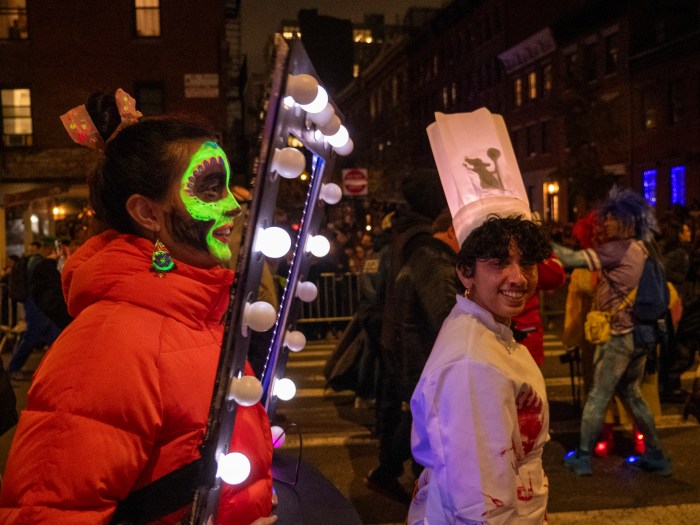
Wooooo! We paraded! We got selfies with strangers! The press even snapped a few pics! I await my two seconds of NYC Halloween faaaame!

Introducing my Making Studio Halloween costume: Foremost a Hollywood-style vanity mirror, it could also be considered a variety of other things—a portal to another world, a look into our alter ego… whatever you wish it to be.


The main mirror element, with the bright, flashing lightbulbs, was meant to accomplish two things: be easily identifiable, as well as fun and flashy. The secondary element of UV lights and UV makeup I added for an additional twist. When deciding my UV lewk, I considered a glamorous make-up look with UV makeup (maybe drag-inspired), or something improvised, but ended up going with a Coco-inspired skull, which felt most in line with Halloween (and easier to manage, with my extremely limited makeup skills).


I used cloth straps to attempt to secure it to my body, but these turned out to be of limited utility (I ended up mostly propping the mirror up with my hands, which was totally fine, since the whole thing is very light). The main drawbacks to not having achieved more of a backpack-style suspension system were: (1) not being able to dance with my arms (2) not getting the height of the mirror quite right — in most photos, my head is at the very top of the frame, rather than more towards the middle. If I made this again, I would work on backpack-style straps early into the making process.


In terms of the process, I learned what I seem to learn time and time again: Things always take longer than I anticipate! I’m always debating between more advance-planning and more figuring-it-out-as-I-go (and by debate, I mean that I always go route #2 then later consider route #1). What I mean in this context is that, for example, I could have considered the backpack straps at the beginning of the construction and design process, rather than trying to work them in at the end. I could also have tested out a few lewks, giving myself options before landing on the one I chose. As for the vanity mirror itself, I’m very happy with how that element turned out! At the end of the day, Halloween is about having fun—and that was certainly accomplished.


I’ll definitely say—this costume project has opened my eyes to the world of possibilities opened up by incorporating light and electronics into a costume. I will *definitely* be incorporating lighting into future costume ideation! And also rollerblades…

Original costume idea sketch

Materials & Tools Used


Circuit Diagram

LED dots + gemma testing

Arduino code
For some reason, my LEDs weren’t executing the fade or pulse function, so I ended up just using theaterchase. Harsha helped me troubleshoot, so the code was on her computer, but I’ll work on recreating a closer version to share here!

That’s all for this Halloween!!!