Carmel – Garbage Light

For my final project I made a companion light for my online show Dumpster Fire.

Instructables link: https://www.instructables.com/Garbage-Light/

video link: https://youtu.be/8EvMQiX6GAA

Dumpster Fire?
Dumpster Fire is an online show that airs on transmissionpit.com. Each episode is made of ‘found footage’ that is less found and more directly sourced from other media artists.

Each episode airs only once, and never again.

https://carmeldeberg.myportfolio.com/dumpster-fire-online-show

Since the show online runs once, I wanted to create a very easily DIY-able light that would act as a countdown timer for when the show will start, and then be a companion light show during the episode.

Viewers can follow the instructables and send me their board info. I add all the participating boards into my Arduino cloud, and five minutes before the show starts, I trigger the code to be transmitted to the Arduinos.

My cat was very concerned with what was going on:

Working on my circuit:

My code:

// Include the NeoPixel library

#include <Adafruit_NeoPixel.h>

// Define the pin where the NeoPixel data line is connected

#define LED_PIN 6

// Define the number of LEDs on your NeoPixel strip

#define NUM_LEDS 8

// Create an instance of the NeoPixel strip

Adafruit_NeoPixel strip = Adafruit_NeoPixel(NUM_LEDS, LED_PIN, NEO_GRB + NEO_KHZ800);

// Array of colors to cycle through

uint32_t colors[] = {

strip.Color(255, 0, 0), // Red

strip.Color(0, 255, 0), // Green

strip.Color(0, 0, 255), // Blue

strip.Color(255, 255, 0), // Yellow

strip.Color(0, 255, 255), // Cyan

strip.Color(255, 0, 255), // Magenta

strip.Color(255, 255, 255) // White

};

int numColors = sizeof(colors) / sizeof(colors[0]);

void setup() {

strip.begin();

strip.show(); // Initialize all pixels to ‘off’

}

void loop() {

for (int i = 0; i < numColors; i++) {

pulseColor(colors[i], 1000); // Pulse the current color over 1 second

}

}

// Function to create a pulsing effect

void pulseColor(uint32_t color, int duration) {

int steps = 256; // Number of brightness steps

int stepDelay = duration / (steps * 2); // Time per step

// Fade in

for (int brightness = 0; brightness < steps; brightness++) {

setStripColor(color, brightness);

delay(stepDelay);

}

// Fade out

for (int brightness = steps – 1; brightness >= 0; brightness–) {

setStripColor(color, brightness);

delay(stepDelay);

}

}

// Function to set all LEDs on the strip to a specific color and brightness

void setStripColor(uint32_t color, int brightness) {

for (int i = 0; i < strip.numPixels(); i++) {

strip.setPixelColor(i, dimColor(color, brightness));

}

strip.show();

}

// Function to adjust the brightness of a color

uint32_t dimColor(uint32_t color, int brightness) {

uint8_t r = (uint8_t)((color >> 16) & 0xFF);

uint8_t g = (uint8_t)((color >> 8) & 0xFF);

uint8_t b = (uint8_t)( color & 0xFF);

r = (r * brightness) / 255;

g = (g * brightness) / 255;

b = (b * brightness) / 255;

return strip.Color(r, g, b);

}

Reflections/next steps:

Instead of having the aluminum foil be the shell, the shell should be cardboard that is lined with aluminum foil. 

I would like to try with a different web-enabled board and led strip. The led strip needs to be one that has a casing as trying to adjust the sculpture Is too much for the delicate solder/wires on the pixel strip. 

I also recently taught my students an additive color theory class. As I was writing up these reflections, it has occurred to me that there is an opportunity to design the instructions for the light in a more detailed way that could also passively teach viewers some color theory as well.

https://youtu.be/2V_RTZIHois

Carmel Final project proposal

For my final project I would like to design a light box that can be made from scrap parts. This light is to go along with an online show I do called “Dumpster Fire” which takes ‘video scraps’ from other filmmakers and media artists and edits them together to form an episode that is a mix of essay film/experimental film/video art.

Link to information about the show: https://carmeldeberg.myportfolio.com/dumpster-fire-online-show

I would like to write a code to go along with each episode that is a designed light show. The light box being made from scrap parts and evoking a dumpster would be a nice way to tie it in to the process of the show.

Screenshot
Screenshot

Some inspiration on how I could achieve different lighting effects with ‘garbage’:

Carmel Plush Night Light “Long Way Home”

Final Photos:

Process photos:

For the snail I created my own pattern. After consulting with Becky, I understood the base shaped that would comprise the pattern. From there it was just test making the snail from muslin until I figured out the proper proportions for the pattern pieces and the proper sewing techniques (mainly order of assembly) for the pieces.

For the pillow I just sewed a simple square, and then hand stitched the sheer fabric on top to create texture.

Circuit:

Carmel Halloween costume

Here is my final Halloween costume:

Process:

First I sewed the base of the mask, with channels for the pixel strip and the top seam. Once The strip was completely wired to the Gemma, I attached it to a flexible metal strip and hot glued the ends of the metal strip to make it easier to feed though the channels I sewed. Once it was fed through I sealed the sides of the mask/veil.

Code/tinkercad circuit:

include

define PIN 6

define NUM_LEDS 4

define BRIGHTNESS 50

// Parameter 1 = number of pixels in strip
// Parameter 2 = pin number (most are valid)
// Parameter 3 = pixel type flags, add together as needed:
// NEO_RGB Pixels are wired for RGB bitstream
// NEO_GRB Pixels are wired for GRB bitstream, correct if colors are swapped upon testing
// NEO_RGBW Pixels are wired for RGBW bitstream
// NEO_KHZ400 400 KHz bitstream (e.g. FLORA pixels)
// NEO_KHZ800 800 KHz bitstream (e.g. High Density LED strip), correct for neopixel stick
Adafruit_NeoPixel strip = Adafruit_NeoPixel(NUM_LEDS, PIN, NEO_GRBW + NEO_KHZ800);

void setup() {

strip.setBrightness(BRIGHTNESS);
strip.begin();
strip.show(); // Initialize all pixels to ‘off’
}

void loop() {
// Some example procedures showing how to display to the pixels:
colorWipe(strip.Color(255, 0, 0), 50); // Red
colorWipe(strip.Color(0, 255, 0), 50); // Green
colorWipe(strip.Color(0, 0, 255), 50); // Blue
colorWipe(strip.Color(0, 0, 0, 255), 50); // White

whiteOverRainbow(20,75,5);

pulseWhite(5);

// fullWhite();
// delay(2000);

rainbowFade2White(3,3,1);

}

// Fill the dots one after the other with a color
void colorWipe(uint32_t c, uint8_t wait) {
for(uint16_t i=0; i<strip.numPixels(); i++) {
strip.setPixelColor(i, c);
strip.show();
delay(wait);
}
}

void pulseWhite(uint8_t wait) {
for(int j = 0; j < 256 ; j++){
for(uint16_t i=0; i<strip.numPixels(); i++) {
strip.setPixelColor(i, strip.Color(0,0,0, j ) );
}
delay(wait);
strip.show();
}

for(int j = 255; j >= 0 ; j–){
for(uint16_t i=0; i<strip.numPixels(); i++) {
strip.setPixelColor(i, strip.Color(0,0,0, j ) );
}
delay(wait);
strip.show();
}
}

void rainbowFade2White(uint8_t wait, int rainbowLoops, int whiteLoops) {
float fadeMax = 100.0;
int fadeVal = 0;
uint32_t wheelVal;
int redVal, greenVal, blueVal;

for(int k = 0 ; k < rainbowLoops ; k ++){

for(int j=0; j<256; j++) { // 5 cycles of all colors on wheel

  for(int i=0; i< strip.numPixels(); i++) {

    wheelVal = Wheel(((i * 256 / strip.numPixels()) + j) & 255);

    redVal = red(wheelVal) * float(fadeVal/fadeMax);
    greenVal = green(wheelVal) * float(fadeVal/fadeMax);
    blueVal = blue(wheelVal) * float(fadeVal/fadeMax);

    strip.setPixelColor( i, strip.Color( redVal, greenVal, blueVal ) );

  }

  //First loop, fade in!
  if(k == 0 && fadeVal < fadeMax-1) {
      fadeVal++;
  }

  //Last loop, fade out!
  else if(k == rainbowLoops - 1 && j > 255 - fadeMax ){
      fadeVal--;
  }

    strip.show();
    delay(wait);
}

}

delay(500);

for(int k = 0 ; k < whiteLoops ; k ++){

for(int j = 0; j < 256 ; j++){

    for(uint16_t i=0; i < strip.numPixels(); i++) {
        strip.setPixelColor(i, strip.Color(0,0,0, j ) );
      }
      strip.show();
    }

    delay(2000);
for(int j = 255; j >= 0 ; j--){

    for(uint16_t i=0; i < strip.numPixels(); i++) {
        strip.setPixelColor(i, strip.Color(0,0,0, j ) );
      }
      strip.show();
    }

}

delay(500);

}

void whiteOverRainbow(uint8_t wait, uint8_t whiteSpeed, uint8_t whiteLength ) {

if(whiteLength >= strip.numPixels()) whiteLength = strip.numPixels() – 1;

int head = whiteLength – 1;
int tail = 0;

int loops = 3;
int loopNum = 0;

static unsigned long lastTime = 0;

while(true){
for(int j=0; j<256; j++) { for(uint16_t i=0; i= tail && i <= head) || (tail > head && i >= tail) || (tail > head && i <= head) ){
strip.setPixelColor(i, strip.Color(0,0,0, 255 ) );
}
else{
strip.setPixelColor(i, Wheel(((i * 256 / strip.numPixels()) + j) & 255));
}

  }

  if(millis() - lastTime > whiteSpeed) {
    head++;
    tail++;
    if(head == strip.numPixels()){
      loopNum++;
    }
    lastTime = millis();
  }

  if(loopNum == loops) return;

  head%=strip.numPixels();
  tail%=strip.numPixels();
    strip.show();
    delay(wait);
}

}

}
void fullWhite() {

for(uint16_t i=0; i<strip.numPixels(); i++) {
    strip.setPixelColor(i, strip.Color(0,0,0, 255 ) );
}
  strip.show();

}

// Slightly different, this makes the rainbow equally distributed throughout
void rainbowCycle(uint8_t wait) {
uint16_t i, j;

for(j=0; j<256 * 5; j++) { // 5 cycles of all colors on wheel
for(i=0; i< strip.numPixels(); i++) {
strip.setPixelColor(i, Wheel(((i * 256 / strip.numPixels()) + j) & 255));
}
strip.show();
delay(wait);
}
}

void rainbow(uint8_t wait) {
uint16_t i, j;

for(j=0; j<256; j++) {
for(i=0; i<strip.numPixels(); i++) {
strip.setPixelColor(i, Wheel((i+j) & 255));
}
strip.show();
delay(wait);
}
}

// Input a value 0 to 255 to get a color value.
// The colours are a transition r – g – b – back to r.
uint32_t Wheel(byte WheelPos) {
WheelPos = 255 – WheelPos;
if(WheelPos < 85) {
return strip.Color(255 – WheelPos * 3, 0, WheelPos * 3,0);
}
if(WheelPos < 170) {
WheelPos -= 85;
return strip.Color(0, WheelPos * 3, 255 – WheelPos * 3,0);
}
WheelPos -= 170;
return strip.Color(WheelPos * 3, 255 – WheelPos * 3, 0,0);
}

uint8_t red(uint32_t c) {
return (c >> 8);
}
uint8_t green(uint32_t c) {
return (c >> 16);
}
uint8_t blue(uint32_t c) {
return (c);
}

Carmel Halloween Costume (second Post)

My costume is a mask that uses light to reverse contour the face, with a veil that will diffuse the light. The intention of my costume is to hide the wearer in ‘bright sight’.

I will first make the veil, and if I have time I would love to try and make an organza full face mask.

I would like to use a photodiode/photoresister to synch the lights in the mask to turn on when the mask senses a camera flash. I would also like to be able to toggle between a few light settings (always on, flicker, photosensitive).

I am using organza for the veil, wire and leds for the mask.

I will be using the Gemma and a photoresistor of some kind.

To do:

  • Finish acquiring electronic parts
  • create wireframe for mask
  • sew/possibly embroider the veil

Purchased:

Carmel’s Plush Light proposal

For my night light project, I am going to make a stuffed snail on a pillow. The pillow will be made to look like a topographic map. When the light is turned on, a pathway is revealed and the underbelly of the snail lights up as well. This is meant to convey the pathway the snail has followed.

The pillow will be made from burlap and different fabric scraps, the snail will be made from muslin.

I still need to deepen the narrative of the project, perhaps by figuring out a more specific motivation for the snail’s pathway through the pillow map.

Fabric choices:

This is the initial prototype I made in class last week:

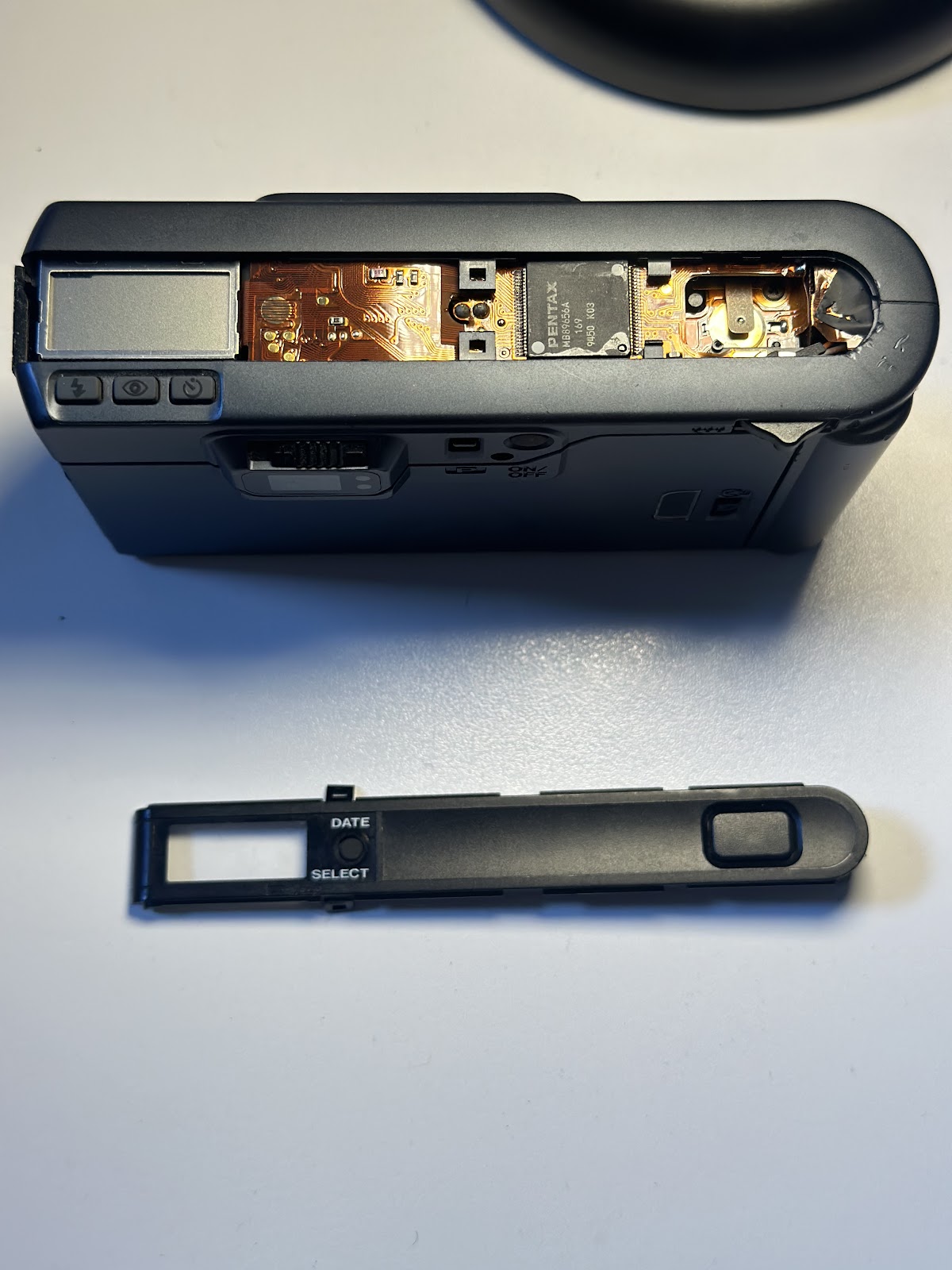
Pentax Espio 80 breakdown 

Tools used: precision screwdriver, precision pliers.

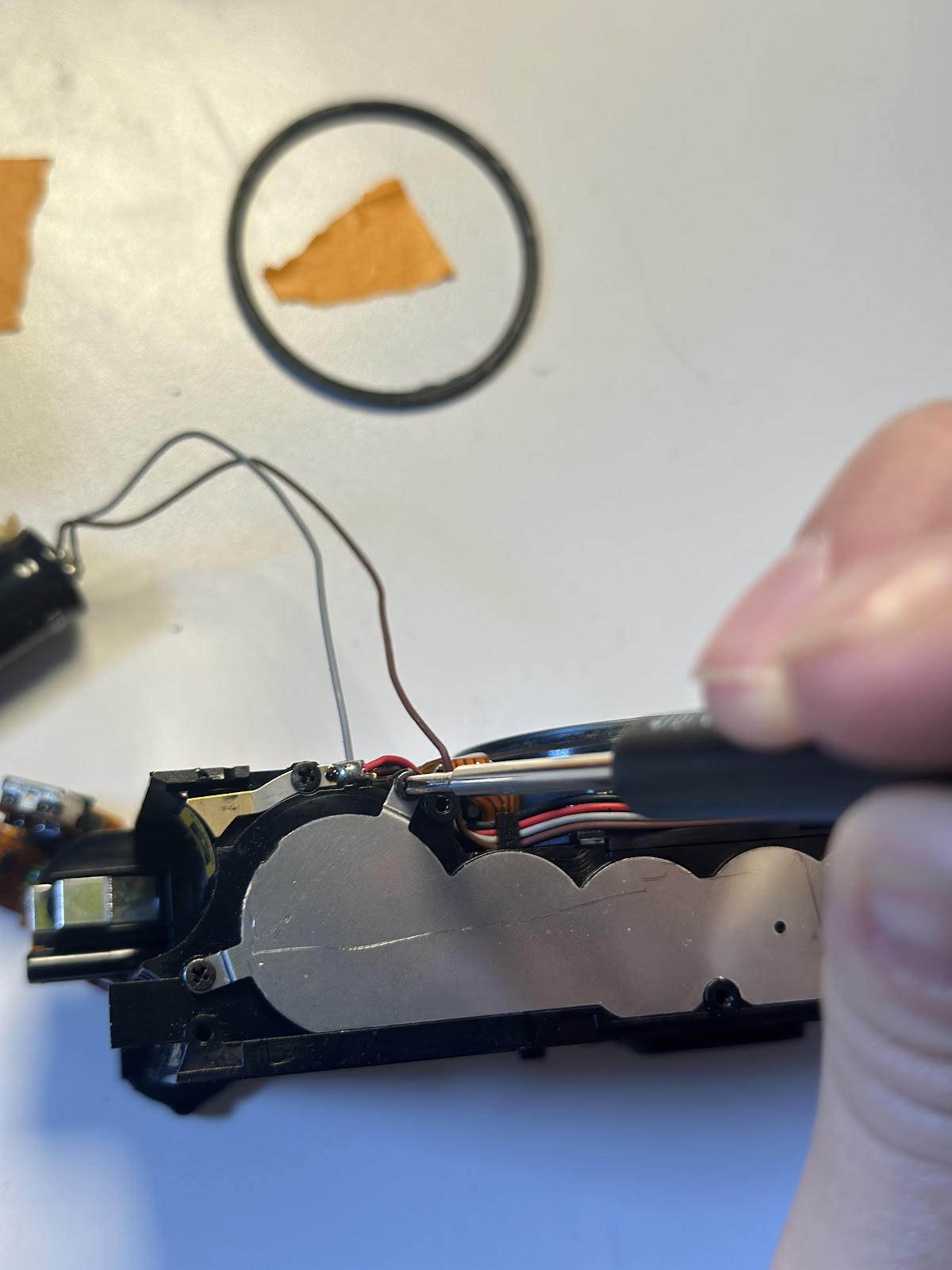
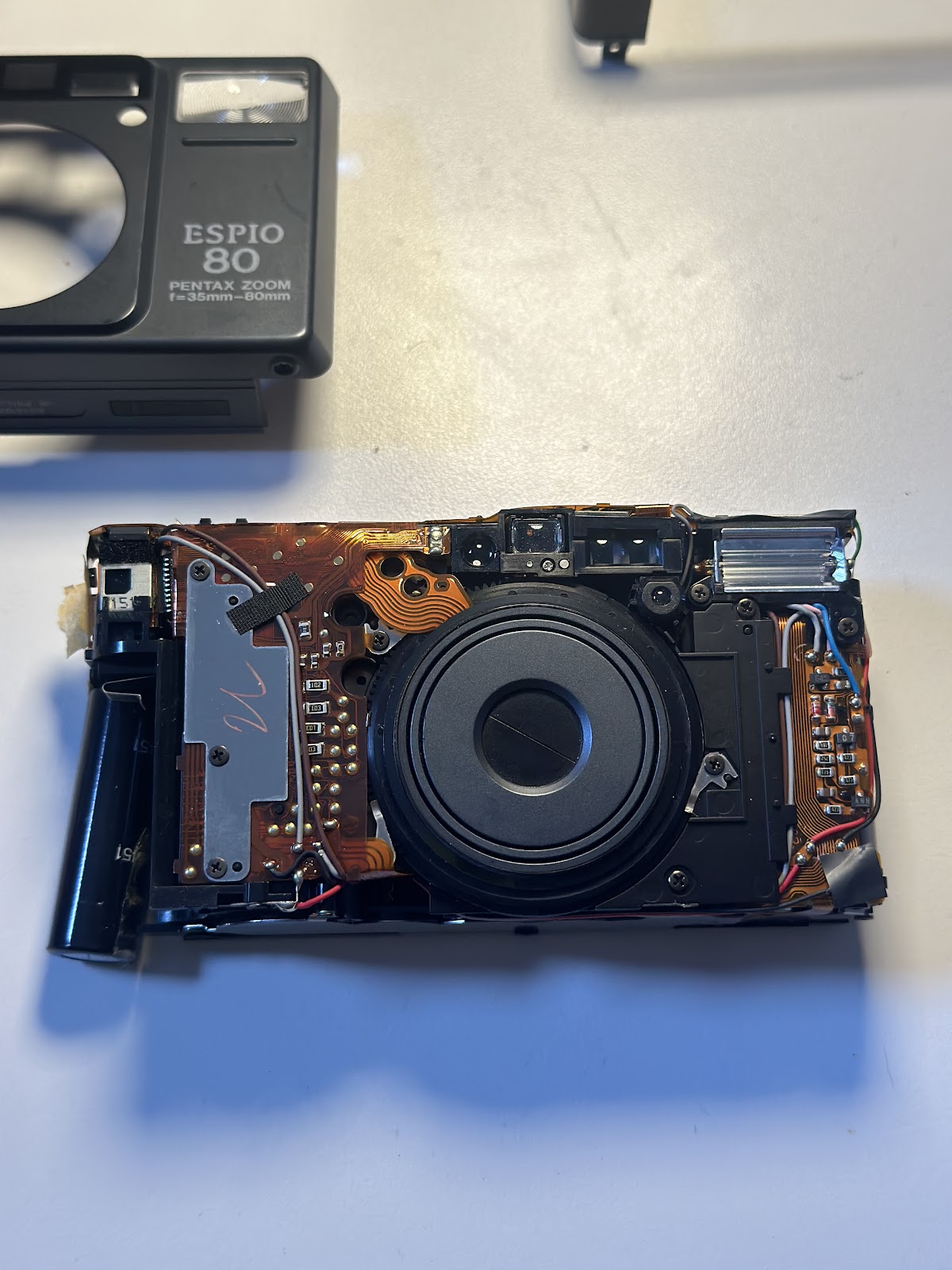
My approach to this teardown was to keep everything as intact as I could. I removed the screws and gently pried the plastic pieces away one by one. I also had to thread the PCB through the parts as I removed it. My biggest takeaway and disappointment was how this camera (like other electronic point and shoots) is manufactured to not be repairable. the way the pieces are stacked, and the PCB is layered, it’s not possible to access certain pieces without destroying others. That being said, the PCB was most impressive to me because it was a single piece woven throughout the different sections and mechanisms of the camera.

I began the teardown by removing the plastic frame pieces.

I then proceeded to loosen the pieces inside the camera that were blocking access to the circuitry. 

Including removing the gear cover plate 

Then I removed the circuitry for the flash 

And the rest of the internet circuitry 

After I removed the PCB, I could access the rest of the internal mechanics of the camera. So I then separated out the film winding mechanism: 

The shutter/zoom lens:

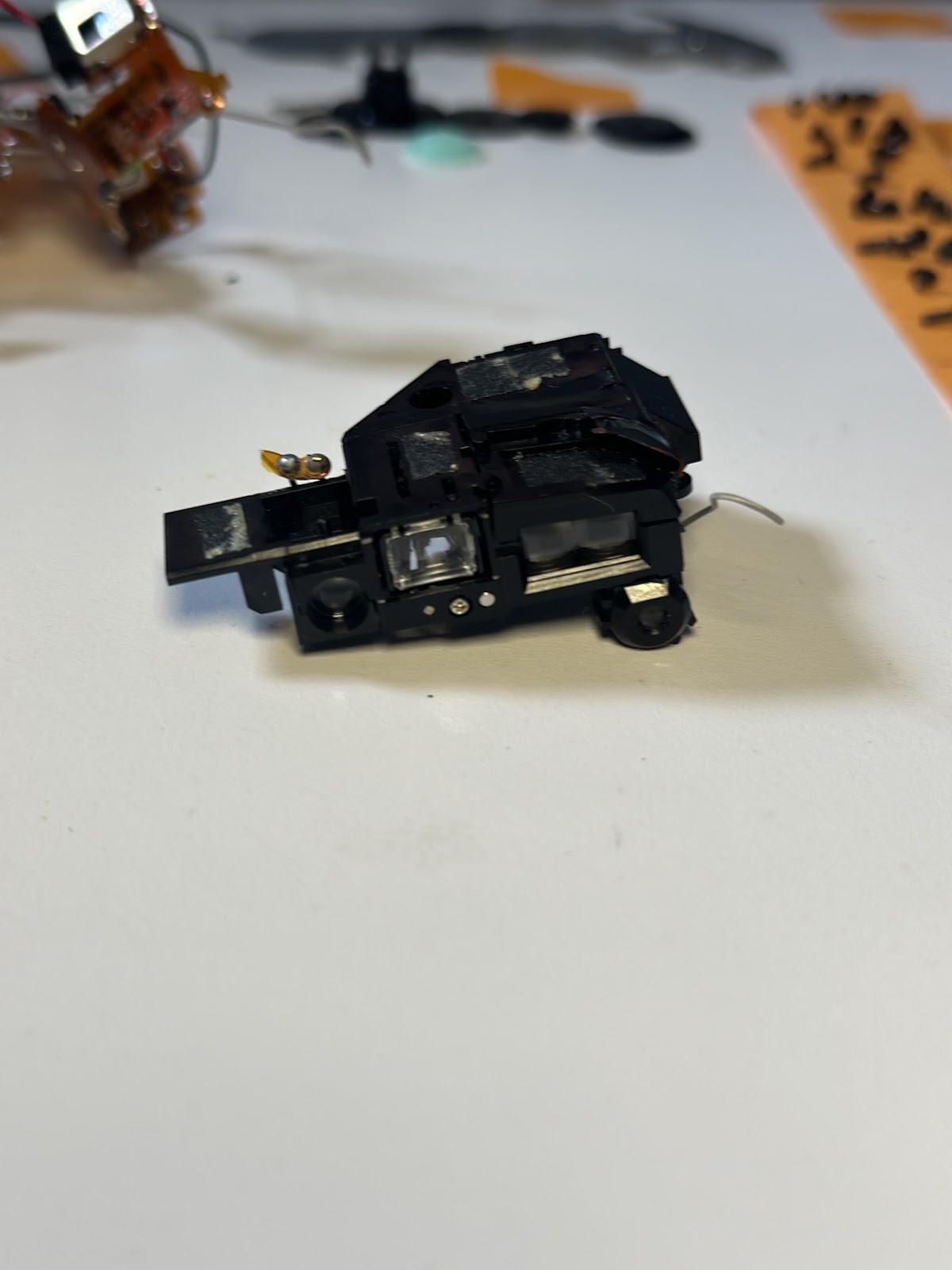
And the viewfinder, which completed the tear down:

PARTMATERIALMANUFACTURING PROCESS
Top plateplasticInjection molding
Exterior body bracket plasticInjection molding
Backdoor plasticInjection molding 
Front plateplasticInjection molding 
Gear cover plateAluminum Die casting 
gearsplasticInjection molding
Internal shutter triggerplastic/metalInjection moulding/die casting
Flex circuit (PCB)copper/acrylicplating/boding/baking 
LCD screenglass/aluminummolding/bonding
Microcontroller 
Lithium-ion battery (for flash)
Semiconductor 
Motor (for shutter)

Hi I’m C a r m e l

@invoice_sent (instagram)

Hi I’m Carmel. I am from New Jersey, but originally from Lisbon. For the past ten years I have been working in the film industry as a gaffer/lighting designer. Outside of the commercial industry I am an experimental filmmaker. In addition to being an experimental filmmaker I am also an oil painter. I have some experience repairing LED lights and have messed around with arduino kits a little bit.

A lot of my lighting design work has been for fashion and indie films, my work is know for its use of color and emotional quality. Many of my professional years have been spent building rigs for the lighting as well. I have experimented with some furniture building at home and have recently started to build my own canvas bars to stretch my own canvas.

I am excited to build my own electronics more and most hesitant to publish myself.