Ana’s Long Distance Hug Plush

Everyone has someone they miss. Maybe it’s distance, maybe it’s conflicting schedules, but seeing loved ones in adulthood is hard. If you miss someone and want to get love and spread some love, here’s how! Instructables Link

SHOPPING LIST

To make this project, you will need 2x of each:

Electronics:

  1. Adafruit MPRLS Ported Pressure Sensor Breakout – 0 to 25 PSI
  2. Adafruit ESP32-S3 Reverse TFT Feather – 4MB Flash, 2MB PSRAM, STEMMA QT
  3. Lithium Ion Polymer Battery – 3.7v 2500mAh
  4. Silicone Tubing for Peristaltic Liquid Pump – 1 Meter

Fabric:

  1. Line Texture Fabric
  2. FUZZY Fluffy sweater

Plus these tools:

  • Soldering tools and supplies
  • Silicone adhesive
  • Hot glue gun with glue sticks

Circuit Diagram

The Adafruit MPRLS Ported Pressure Sensor Breakout and Li-ion battery are attached to the Adafruit ESP32-S3 Reverse TFT Feather.

Attach Tubing to Sensor

Make sure to use a silicone adhesive when attaching the tube to your sensor, because the only thing that makes silicone stick is silicone. 

I personally had a lot of trouble with this one. The first one attached like bread to butter, perfection! The second tube on the other hand….. Messy.

Connect to Arduino IoT Cloud

In order to connect my board, I created a boolean variable for my Thing through the Arduino IoT Cloud. By inputting my network and device information within the code, I was able to connect.

Patterns & Sewing

For the patterns, I was originally going to make a stingray and an octopus, but due to time constraints, I am going with my mom’s favorite shape, a triangle!

Genuinely making the pattern to sew for this was pretty intuitive. I just cut out two large triangle pieces then cut out the strips that go in between the two triangles to create volume.

Hug Code

// Long Distance Hug by Ana Jay, code from Parihug IoT Hug project by Xyla Foxlin, adapted 2023 & 2024 by Becky Stern

// Watch the video: https://youtu.be/u6gj8VzrHBo

// Tutorial: https://beckystern.com/2023/11/27/hug-sensing-iot-parihug-toy-w-xyla-foxlin/

// This code is in the Public Domain

#define SECRET_SSID "Internet of Things Class"

#define SECRET_OPTIONAL_PASS "iheartarduino"

#define SECRET_DEVICE_KEY "gg0N8MV!wlYjIqlA8m#Db@yW@"

#include <ArduinoIoTCloud.h>

#include <Arduino_ConnectionHandler.h>

#include <Adafruit_GFX.h>    // Core graphics library

#include <Adafruit_ST7789.h> // Hardware-specific library for ST7789

#include <SPI.h>

// Use dedicated hardware SPI pins

Adafruit_ST7789 tft = Adafruit_ST7789(TFT_CS, TFT_DC, TFT_RST);

const char DEVICE_LOGIN_NAME[]  = "15f3eccb-0c6f-46a8-8ef1-183a610a3a3c";

const char SSID[]               = SECRET_SSID;    // Network SSID (name)

const char PASS[]               = SECRET_OPTIONAL_PASS;    // Network password (use for WPA, or use as key for WEP)

const char DEVICE_KEY[]  = SECRET_DEVICE_KEY;    // Secret device password

void onHugChange();

bool hug;

void initProperties(){

 ArduinoCloud.setBoardId(DEVICE_LOGIN_NAME);

 ArduinoCloud.setSecretDeviceKey(DEVICE_KEY);

 ArduinoCloud.addProperty(hug, READWRITE, ON_CHANGE, onHugChange);

}

WiFiConnectionHandler ArduinoIoTPreferredConnection(SSID, PASS);

#include <Wire.h>

#include "Adafruit_MPRLS.h"

// You dont *need* a reset and EOC pin for most uses, so we set to -1 and don't connect

#define RESET_PIN  -1  // set to any GPIO pin # to hard-reset on begin()

#define EOC_PIN    -1  // set to any GPIO pin to read end-of-conversion by pin

Adafruit_MPRLS mpr = Adafruit_MPRLS(RESET_PIN, EOC_PIN);

void setup() {

 // Initialize serial and wait for port to open:

 Serial.begin(9600);

 //pinMode(12, OUTPUT);

 // This delay gives the chance to wait for a Serial Monitor without blocking if none is found

 delay(1500);

 // Defined in thingProperties.h

 initProperties();

 // Connect to Arduino IoT Cloud

 ArduinoCloud.begin(ArduinoIoTPreferredConnection);

 /*

    The following function allows you to obtain more information

    related to the state of network and IoT Cloud connection and errors

    the higher number the more granular information you’ll get.

    The default is 0 (only errors).

    Maximum is 4

 */

 setDebugMessageLevel(2);

 ArduinoCloud.printDebugInfo();

  Serial.println("Testing MPRLS sensor...");

 if (! mpr.begin()) {

   Serial.println("Failed to communicate with MPRLS sensor, check wiring?");

   while (1) {

     delay(10);

   }

 }

 Serial.println("Found MPRLS sensor");

 // turn on backlite

 pinMode(TFT_BACKLITE, OUTPUT);

 digitalWrite(TFT_BACKLITE, HIGH);

 // turn on the TFT / I2C power supply

 pinMode(TFT_I2C_POWER, OUTPUT);

 digitalWrite(TFT_I2C_POWER, HIGH);

 delay(10);

 // initialize TFT

 tft.init(135, 240); // Init ST7789 240x135

 tft.setRotation(3);

 tft.fillScreen(ST77XX_BLACK);

// large block of text

 tft.fillScreen(ST77XX_BLACK);

 testdrawtext(

     "Booting hugs... ",

     ST77XX_WHITE);

 delay(1000);

tft.fillScreen(ST77XX_BLACK);

 Serial.println(F("Initialized"));

}

void loop() {

 ArduinoCloud.update();

  float pressure_hPa = mpr.readPressure();

 Serial.print("Pressure (hPa): "); Serial.println(pressure_hPa);

 Serial.print("Pressure (PSI): "); Serial.println(pressure_hPa / 68.947572932);

   if (pressure_hPa > 1100){

   hug=true;

   Serial.println("Hug = true");

 //    Serial.println("buzz buzz loop");

 //  digitalWrite(12, HIGH);

 //  delay(1000);

 //  digitalWrite(12, LOW);

 // large block of text

 tft.fillScreen(ST77XX_BLACK);

 testdrawtext(

     "Hugs! I love you. ",

     ST77XX_WHITE);

 delay(5000);

 tft.fillScreen(ST77XX_BLACK);

 }else{

   hug=false;

   Serial.println("Hug = false");

 }

 delay(1000);

}

/*

 Since Hug is READ_WRITE variable, onHugChange() is

 executed every time a new value is received from IoT Cloud.

*/

void onHugChange()  {

 if(hug==true){

  Serial.println("onHugChange has been called");

 //  digitalWrite(12, HIGH);

 //  delay(1000);

 //  digitalWrite(12, LOW);

   tft.fillScreen(ST77XX_BLACK);

 testdrawtext(

     "Hugs! I love you. ",

     ST77XX_WHITE);

 delay(5000);

 tft.fillScreen(ST77XX_BLACK);

 }

 }

void testdrawtext(char *text, uint16_t color) {

 tft.setCursor(0, 0);

 tft.setTextColor(color);

 tft.setTextWrap(true);

 tft.print(text);

}

FINAL VIDEO

Ana’s Long Distance Hug Plush

[NOTE: name pending]

Long Time, No Hug!

For my final project, I will be creating a plush toy meant for long-distance hugs! Everyone has someone they miss. Maybe it’s distance, maybe it’s conflicting schedules, but seeing loved ones in adulthood is hard.

What’s my story?

My parents are divorced, and my mom ended up moving back to LA, where she and her family first immigrated to the US. All of her family is there and her mom is getting older. I’m so happy she moved there to be with her family, but also we miss each other so much it hurts sometimes. In my opinion, there is no cure like a mother’s hug.

I’ll be visiting my mother in December for the holidays and her birthday, and I thought it would be nice to be able to give her a special, handmade gift built with love. She is also getting surgery when I’m visiting, and I won’t be able to hug her this time around (BIG BUMMER!) so I will be able to take these plushies and absolutely SQUEEZE them whenever I need a mama cuddle.

Below is a prototype circuit for my final project:

[NOTE: I will not have a vibration motor in the final diagram]

Shopping List:

Electronics:

  1. Adafruit MPRLS Ported Pressure Sensor Breakout – 0 to 25 PSI
  2. Adafruit ESP32-S3 Reverse TFT Feather – 4MB Flash, 2MB PSRAM, STEMMA QT
  3. Lithium Ion Polymer Battery – 3.7v 2500mAh
  4. Silicone Tubing for Peristaltic Liquid Pump – 1 Meter

Fabric:

  1. Blue/purple fabric
  2. Wide Water ripple ruffles
  3. Line Texture Fabric
  4. FUZZY Fluffy sweater
  5. Sherpa Fleece
  6. 3D EMBOSSED TEXTURED CREPE

My Instructables Account: https://www.instructables.com/member/caghjayan/

My Instructables Google Doc Draft: https://docs.google.com/document/d/1kiAaUb0MJ6gF6SpPkAyfUxLOBQCFguUcOG4YChD7JJU/edit?usp=sharing

Here are some inspo pics for my plushies:

My mom’s and my favorite animals, so believe it or not, I’ve chosen the two least complicated animals to make!

Here are my current sketches for looks and patterns:

How do I imagine my product video looks like?

The video will probably follow a story of missing someone and showcasing the feeling of not being able to hug them. In the video, we will showcase this product being introduced to the long-distance pair. I want to highlight the LED screen showing messages and the hug count going up, as well as displaying the happy nature this product will give after each hug AND showing how good it feels on the receiving end as well.

What are my next steps?

  • Finalize Instructables document
  • Shoot project video

Ana’s Final Ideas

After watching the playlist of Youtube videos, I felt very intimidated about what I had the capability of accomplishing in these next 5 weeks. Although, I also felt really inspired about what is possible when some of these new skills I’m learning come together in even small ways.

I may have been too inspired because I’m not entirely sure how feasible these are, but I’d love feedback on easier ways to accomplish any of these if they’re not possible in this time frame (or budget 😅).

Idea #1: Work Louder/Teenage Engineering Inspired Shortcut Keyboard

Inspired by these gorgeous controllers, I’m interested in creating something of my own. I think it could be cool to make a shortcut keyboard for a Figma as well, but I also thought it could be interesting to make a mini controller to control Spotify. I also considered a controller for my Roku to be able to create a shortcut button for all my favorite streaming services or even go-to shows. I’m still pondering those options and am also open to being told that might not be feasible! Here is a sketch of what the Spotify one might not look like.

Idea #2: Long Distance Hug Plush

My mom lives in Los Angeles and I always miss her so much, especially her hugs. I think it would be really sweet to make matching plushies that interacted even over long distances. Literally giving the gift of a hug whenever you might need one or want to send one. The plushie counts how many times it is hugged and keeps track on its arm, then refreshes the next day. Below is my sketch of what that may look like.

Idea #3: MiMU Inspired Compositional Gloves

I’m a huge fan of Imogen Heap and I have been watching her over the years develop her MiMU Gloves. I’ve always been so inspired by her desire to move music further (her and, separately, will.i.am; very cool stuff).

With these gloves, you are able to control the sound of your music and create live compositions. I’d like to explore if I could do the same at a way smaller scale. Again, not sure I got too inspired but I’d love to know if any of these are realistic. Here is a sketch of what that might look like.

[BONUS] Idea #4: Ultimate Weather Machine

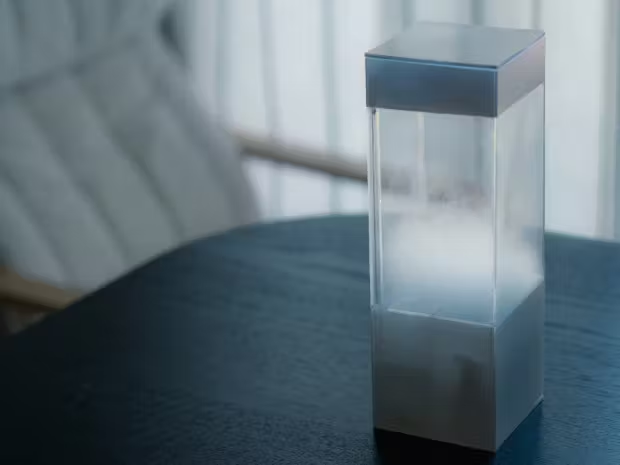
I would love to be able to make this. It is a machine that is synced with a weather app to display live weather updates. However a similar item exists, The Tempescope created by Ken Kawamoto.

This would be a very similar design as to how I even originally imagined so I can still make it my own as I finalize the prototype. Below is a sketch of my visualization.

Overall, these are my 3 ideas plus a bonus:

  1. Work Louder/Teenage Engineering Inspired Shortcut Keyboard
  2. Long Distance Hug Plush
  3. MiMU Inspired Compositional Gloves
  4. Bonus: Weather Machine

My faves are definitely the plush (I’d love to gift to my mom for Christmas) or the weather machine (I’d love to be able to push myself and make this while I have the resources and potential help to do so if I get stuck). I also really love the idea of making my own Figma keyboard but we’ll see. I’d love to hear your thoughts and tips 🙂

Ana’s Sims Halloween!

For Halloween this year I will be going as Angela Pleasant of the Pleasant twins of the Pleasant Family of the Sims Universe 🙂 Sophia Haase will be teaming up with me as my twin sister, Lilith Pleasant! So far, we have purchased our outer material for the Plumbob and headbands for our structure. I already just so happened to have some red wigs, so we will just be using those (unfortunately, I don’t have those links!) I’ll be dressing more dark, and Sophia will be dressing

lighter to match the characters’ vibes.

The goal is just to have fun and be a cute lil Sim for realsies! I honestly have always wanted to do a joint or group costume but my friends never loved me enough (jkjk) but I’m so happy Sophia was also into this idea.

In terms of Arduino, I’d like to create a button that changes colors with each press (1 click –> green, 2 clicks –> red, 3 clicks –> yellow/orange or pink). I believe you mentioned a trick for obtaining this with a certain code with Arduino but I forgot to write it down so I will be writing that information tomorrow hopefully 🙂

Circuit Diagram:

To Do:

  • Take more concept photos
  • Finalize our outfits
  • Try on wigs to ensure they’ll work (especially with headbands)
  • Craft Plumbob and attach to headband
  • Code Arduino
  • Put LED into Plumbob and have a blast on Oct 31!!

_______________________________________________

UPDATE:

Let’s revisit that to do list:

  • Take more concept photos
  • Finalize our outfits
  • Try on wigs to ensure they’ll work (especially with headbands)
  • Craft Plumbob (this is done but will be finalized after LED and Code are final)
  • Attach to headband
  • Code Arduino
  • Put LED into Plumbob
  • Have a blast on Oct 31!!

So just a bit more to finalize! Overall, not much has changed since last time. I already had the wigs and the rest of the supplies were all we ended up using.

So far we have been able to attach the Plumbob to the wire and the wire to the headband.

We also have been able to solder 2 Neopixel LED strips to our Gemma M0 board. Sophia has had luck and unfortunately, I have not. I am not able to get my board working but we will be sorting out all the final issues tomorrow during class.

Christiana’s Halloween Costume

Before we begin, here is my lil Arduino circuit 🙂

Below you can find my proposal for Halloween ideas. I am really open to feedback!

IDEA #1

Sims Diamond

The concept here is simple, but if executed well, it will be super fun. I’d love to be able to create a Sims diamond headband. The diamond above my head will glow. I would like to line the inside of the diamond with LED strips (ideally, I would like to change colors the same way that Sims does). I was thinking of using maybe a vinyl green material as the outside and possibly white tissue paper to diffuse the light. I was also considering creating the frame with wire and wrapping the materials around that. This might be my most desired project but I really like my other two.

IDEA #2

Coraline Portal Box Bag

I’d like to manipulate tissue paper and LED strips to create a cool illusion-type box mimicking the portal from Coraline. Overall, the whole box will be opaque white from the outside, and then when you open the door, you see the portal and the lights. I really like this idea but I’m not sure if this is possible at my skill level.

IDEA #2

Avatar Headband and Gloves

I love this idea so much but it’s also another idea I may not have the skill for in this timeline. I’d like to attach LED strips under a white fabric (shaped by wire to stay in place) to mimic when Aang enters his Avatar state. Ideally, I’d like to use a very translucent material for the gloves and add a more opaque white material for the arrows. I might cut up some tights and attach the arrows to that for my arms. I’m open to any tips! I think I’m most worried about making the everything work and making the batteries easily portable while attached to the headband and gloves.

BONUS IDEA #4:

Flower Garden Headband

This idea would be 3 headbands attached to create rows and I would have a bunch of LED bulbs attached. After the lights were secured onto the headbands, I’d attach the fabric to each other lights to create the effect of being a flower. This is definitely my weakest idea, and I likely won’t do it, but I wanted to include it as a possible contender.

Ana’s Kuchi Kopi Plush Night Light

Kuchi Kopi is a fictional child’s toy from the TV Show, Bob’s Burgers. I wanted to take it a step further by making it a Matryoshka doll and by decorating each level as a different Bob’s Burgers character: Bob, Linda, Tina, Gene, and Louise.

This toy could be ideal for anyone who is a Bob’s Burgers fan and wants an attractive light display to celebrate a show they love. I personally am a huge Bob’s Burgers fan (hence, why I’m even doing this) and I am actually excited to have this out on display. I’m also genuinely proud I was able to make this work, even if it’s not perfect. It’s something I can really envision brightening someone’s day as they pass it because not only can you have a nice green glow display, but you can really interact with the toy and pull out each character.

I used a polyester brat green material for the cover and I used a thicker polyester cream material for the inside to help create a buffer layer as well as the inner pocket.

I was going to use a sewing machine but I ended up just hand stitching the whole thing. I started by measuring out the patterns in Illustrator to make sure they all fit within one another and without going too big for the outer doll. Then I cut out two pieces of the pattern per material (2 green pieces and 2 cream pieces per doll size). I then sewed a green piece to a cream piece and then sewed the two connected pieces to each other. I finished each layer off by stuffing it and closing out the outer openings while keeping the pocket open.

I decided to go with 3 lights and my circuit diagram is below. This whole project was a huge challenge, and unfortunately, my vision wasn’t completely measured correctly, so I wasn’t able to fit the lights within the plushie as I originally intended. So, the display stand is a last-minute addition. If I had more time or faster skills, I would’ve started over, but unfortunately, this time, I wasn’t able to deliver the final product I originally envisioned.

Overall, this project was such a challenge but I’m really proud of what I was able to accomplish. I guess I challenged myself a little too much because I wasn’t able to execute my proper vision but I am going to cherish this lil guy for a long time.

UPDATE:

I have come back to this project to experiment with adding the light within a plushie, and Linda was looking to get a makeover! Her cute green blush would light up any room 🙂

Christiana Aghjayan’s Plush Night Light Proposal

After learning to sew in Becky's class, the most magical thing happened...

I was able to sew!

Prototype 0

Below you can see images of protoype 0, which embodies a more fluid shape and contains 2 contrasting materials: cotton and satin.

My initial prototype was fun and cute but after brainstorming some different ideas, I have decided to go in another direction.

In comes the brainstorm for Prototype 1…

Breakdown of ideas:

  1. Tinkerbell’s Shadow in a Canvas Bag
  2. Kuchi Kopi Nightlight
  3. Egg with Light-Up Yolk

Option Number 2: Kuchi Kopi Nightlight

Kuchi Kopi is a fictional toy from the TV show Bob’s Burgers. It is a cute huggable nightlight that Louise Belcher, the youngest daughter in the show, sleeps with every night. I brainstormed creating the original Kuchi Kopi or creating the whole Bob’s Burgers family as Kuchi Kopi forms, but this will depend on my time. 😅 I think this product could be targeted at children who may find it cute or even adults who really love the Bob’s Burgers franchise.

Below is a draft diagram of what I believe my circuit will look like as well as a list and photos of some materials I’ll be using for the completion of my project some photos of the material I will be using. I will also be using some felt material if I decide to create the entire family as Kuchi Kopis.

Lamborghini Aventador RC Car Teardown

Breakdown of Components & Manufacturing Techniques

Press Each Category Below To List Each Component And Materials 🙂

Body Of Car
  • Top: plastic; outer shell resembling the real Lamborghini Aventador)
  • Bottom: plastic; underbody of the outer shell)
‘Engine’
  • Chip XT-015R (4-20mA Current Transmitter with Sensor Excitation and Linearization) metal and plastic; monolithic 4-20mA, 2-wire current transmitter with two precision current sources, serves as the car’s internal controls
  • Conductive Metal: copper; located on the inside of the top of the car, conducts electricity from the batteries to the front wheels
  • Wires: copper and rubber; red and black covered wires used to transmit electrical signals to all parts of the vehicle
Wheels
  • Power Box: plastic; mounted right under the battery slot in a white, small container with grease
  • Front Wheels (plastic; free-standing, not attached to the outer body)
  • Motored Rear Wheels (plastic; attached to the outer body, sealed in an enclosure that cannot be opened)
  • Rear Wheel Gearbox (plastic and weird lubricant; resting above the rear wheels, filled with a white grease that seems to keep the gears lubricated so that the rear wheels can turn)

Tools and Techniques Used For Teardown

I only needed to use my hands and a generic tiny screwdriver 🙂

2 Design Highlight

North/South and East/West directional controls on the controller

I personally think that it makes perfect sense to keep the controls to a rigid two-direction option, however, I personally prefer a controller with more mobility in its use. Overall, though, this tactic is straight to the point and effective.

The car’s purpose is to drive rather than capture the car’s details

When I first received this car, my first instinct was to try to open the doors to see how detailed the model actually was. Unfortunately, the entire car’s body was just mainly one big piece covering the ‘engine’ inside. I understand this is more cost-effective, especially if the purpose is speed, not Lamborghini details.

Final Thoughts

Overall, this seems to be a nicer RC car, but a cheaper car model. This was a fun product to teardown, as I was surprised by what I found inside. Not as much material is needed to create some fun!

Hey, I’m Ana (✿◠‿◠)

I’m born and raised in New Jersey but I like to consider myself NJ’s finest New Yorker. 😋 Before POD, I was working at Berlin Rosen PR agency (also based in NY), on the gaming and digital entertainment team. Working for companies like Unity, Casetify, Krafton, holoride, etc. I love working in tech specifically but I’m pretty interested in anything not fintech or health tech. 😅 I’m really looking forward to learning how to code more and also in general learning more skills towards hand crafted design. My background is more digital focused so I’m excited to get more physically crafty. I’m genuinely not apprehensive about this class, I believe I’ll do my best and learn a lot, any mistakes are just lessons along the way. 🤞🤞

✨✨✨

Favorite Things:

  • Craft: Hmmmm this one’s tough but crochet and 3D design have been 2 new art forms I like playing around with
  • Eat: Cereal or Soondubu jjigae (or I guess any soup)
  • Movie: Mr. Bean’s Holiday
  • Show: Adventure Time
  • Do: Aside from visual art, I enjoy making music or learning languages

SOCIAL MEDIA LINKS

you can find me on every platform at @itsanajay

Here are some cute baby pics 🙂