Embroidered Chandelier x Arduino

I hadn’t quite figured out what I could do with a chandelier, but as I’ve decided early on this semester, I wanted to integrate my own culture into as many projects as possible. And as long as it made sense.

As I headed down to Canal Plastics to pick up some acrylic for the project (I had thought of lasercutting them, although in what shapes I didn’t know), I stopped by the quintessential Chinese market in Soho: the Pearl River. In there (they don’t allow photos, unfortunately), I saw a variety of colorful Chinese lanterns and I knew right then I wanted to use them. I just needed to make them look like a chandelier, which, coincidentally, isn’t too far of a stretch since Chinese lanterns are hung in multitudes during the Chinese Lantern Festival, which marks the end of the Lunar New Year:

Chinese lanterns symbolize togetherness, well-being, and good fortune, having been part of the Chinese tradition for at least two thousand years.

I also need to incorporate some embroidery, so I picked out a few paper lanterns with eyelets, so I can put yarn through them. Here’s a photo of my embroidery in progress:

Since lantern were originally used as portable lights (they helped blocked candles from the wind, making them basically an ancient form of flashlights), I wanted the LEDs to mimic the flickering motions of the candle flame. To do that, I plan on modifying the “Blink” code along with the “Button” code to control it:

Blink
Button

Duct Tape crafts

There is a term called “ductivity” so i decided to try doing some crafts by using duct tape to make a bike more visible in the streets using a FSR sensor.

Here is a video how to make a “super-cute duct tape headband”.

I will use FSR with my Arduino for this project

<p><a href=”http://vimeo.com/11392379″>Graphing FSR input with Arduino and Processing</a> from <a href=”http://vimeo.com/rourboat”>Ro</a&gt; on <a href=”http://vimeo.com”>Vimeo</a&gt;.</p>

A New Book Interface

I was truly floored by this book concept, originally seen on Adafruit’s blog here. Using an Arduino, this artist created a new way to combine a book and computer into one experience. The video does a great job illustrating the entire process from sketch through final interface. I love the idea of a physical, printed book being connected and controlling a digital interface, and one that is so beautifully made.

Edible Email Notifier – In Progress

I’ve been writing a lot of code the past few days, and I finally got the LED to light up when I have email! Above is a photo of my components and some of my coding notes. I’m currently working on the code for the stepper motor, and will attach it to the bread board later today.

The main tutorial that’s been very helpful is this email notifier. I’ve taken their approach, but added extra code for determining how many emails there are and if that number is different from the previous count.

FSR Activated Tyvek Bike Accessory

Hello class! I’m excited to share with you my in-progress bicycle brake light. As of now, the housing has been laser-cut and the LEDs are working with a pushbutton. This is illustrated below.

This project is inspired by the recent bicycle/driver related accidents and violence in my hometown. Here is an article describing one of the events. Its always precarious to slow down or stop suddenly while riding in heavy traffic since there is no indication of this with standard lights.

I think I will use the Adafruit tutorial for the FSR sensor which is going to be mounted on the brake lever.

Embroidered Lamp Project

UPDATED IDEA

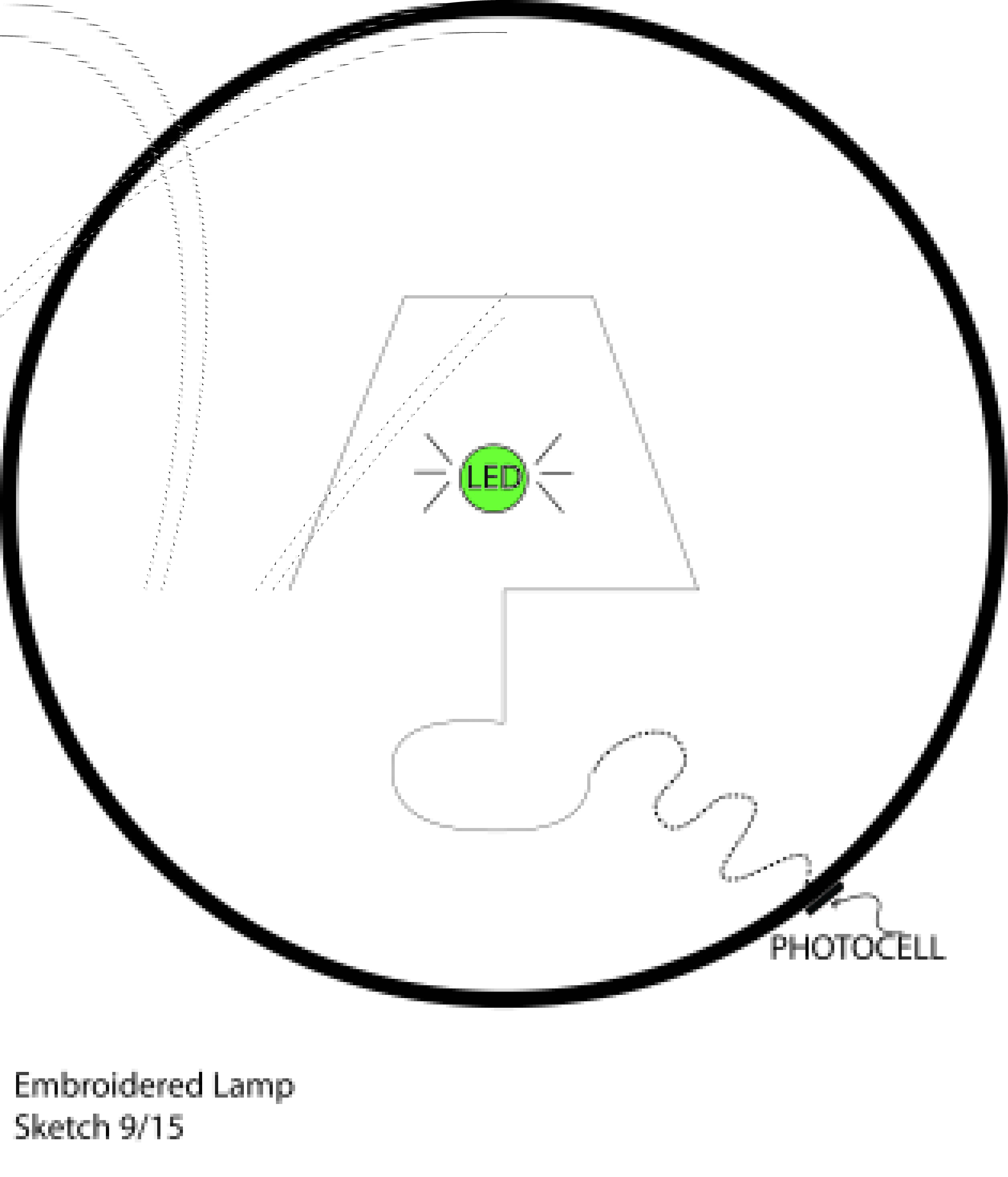
As an update for this project, I decided against the below sketch as I was having complications with my LDR piece, as after multiple attempts, I could get no reading off of the input.  Ultimately, after reconsidering the input, I came up with the little sketch below.

I am more pleased with this outcome, it is a bit more fun as well.


Cartoon sketch with embroidered sketch.


I was able to use one of the example codes File > Examples > .02Digital > Button in conjunction with the description on how to tweak a basic button function found in pages 43 – 50 in the Getting Started with Arduino book.

Was able to stab that little button through the fabric directly into the breadboard.

And the reverse, to show how I secured the LED.  I just embroidered the cord directly into the design.

ORIGINAL IDEA…

For this project I am exploring using an LDR to make a light detector lamp.  I am imagining a embroidered scene you can hang on a wall, which when the ambient light in the room fades, the LED “lamp” automatically turns on.

I have found this instructibles page that seems to explain the process fairly well.

Below is a quick sketch I put together today of the direction I had imagined this going.

Image

3D Privacy Device

I’m thinking of taking my space creator further for this week’s Arduino project. I’ve spent some time today working with an IR sensor. The most useful link I found to learn the basics of this was a distance calculation project.

Through this, I was able to switch on an LED when the sensor reads an obstacle. I also found this project which details LED-IR led arduino instructions with some helpful links.

Edible Arduino Mousetrap

Hey Guys,

Sooo, I think I’m going to incorporate morse code into my project and an scan of the world wide web firstly gave me this;

but then also this slightly more informative tutorial.

This is SOS;

int pin = 13;

void setup()
{
pinMode(pin, OUTPUT);
}

void loop()
{
dot(); dot(); dot();
dash(); dash(); dash();
dot(); dot(); dot();
delay(3000);
}

void dot()
{
digitalWrite(pin, HIGH);
delay(250);
digitalWrite(pin, LOW);
delay(250);
}

void dash()
{
digitalWrite(pin, HIGH);
delay(1000);
digitalWrite(pin, LOW);
delay(250);
}

Cool right? I didn’t know you could type it in as dot and dash.

You can check out the full tutorial here.

People are also very wierd.

Have a great night!