Carol’s Divination Ball

I made a divination ball made for diviners. When the diviner’s hand is close to the crystal ball for a period of time, the heat sensor will light up the built-in LED light when it senses the heat. This device can enhance the sense of atmosphere and mystery of divination.

Materials/ tool list: 

Wires 

Wire strippers

Flush diagonal cutters

Soldering iron & solder

Small needle-nose pliers

NeoPixel strip

Bread board

Breadboard wires

Arduino Metro

Adafruit MCP9808 Temperature Sensor

https://www.amazon.com/dp/B09G3LSNFM?psc=1&ref=ppx_yo2ov_dt_b_product_details

Beam Lighting 6-inch White Acrylic Replacement Globe – Cover for Ceiling

https://www.amazon.com/dp/B097G9MJBV?psc=1&ref=ppx_yo2ov_dt_b_product_details

Micro USB cable

Lipoly battery & charger

Wood

Circuit Diagram:

Coding: https://docs.google.com/document/d/1MoPsuxlAprdoucW_QOS-15f-0TRcV3CsLqHGlua8EZM/edit

Process:

  1. Prep three of your breadboard wires by cutting off the connectors at one end and stripping the ends to expose the bare strands of wire. Twist the strands of each wire to keep them together, then heat up the wire with your soldering iron and apply a small amount of solder. Then tinned NeoPixel strip and solder it with the wires. 
  2. Wire it up to Metro. Make sure the NeoPixel strip works.
  3. Go to File – Examples – Adafriut NeoPixel – strandtest. We always start from the examples.
  4. Go to https://learn.adafruit.com/adafruit-mcp9808-precision-i2c-temperature-sensor-guide. Follow the instruction to set up the sensor.
  5. Open up the Arduino library manager and search for the Adafruit MCP9808 library and install it. Open up File->Examples->Adafruit_MCP9808->mcp9808test and upload to your Arduino wired up to the sensor. Now open up the serial terminal window at 9600 speed to see the temperature in real time. You can try touching your finger to the sensor to see the temperature rise.
  6. get rid of the white stuffs to make sure that the sensor can be stick to the ball.

Be sure to test the device before the next step.

7. Make a base for the ball. 

1) Trace the shape of the base at the bottom of the ball and the overall shape you want the base to be on the board.

2) Cut with the wire saw, then sand it smooth.

3) Finish cutting the overall shape of the base with the bandsaw.

4) Take care to calculate the height of the base (you will need to hide the Arduino board etc. inside).

5) Test that the plastic sphere fits just right into the base.

6) Color the base with wood stain and dry for at least an hour.

Storytelling Video

Stop Motion Animation with Needle Felting

Instructables Link: https://www.instructables.com/Make-a-Temperature-sensitive-Divining-Ball/

Carol’s Final Project Process

Photos of prototype circuit and form:

https://www.tinkercad.com/things/2FhpqityYei-divining-sphere

Link to the Google Doc draft tutorial:

https://docs.google.com/document/d/1wk7dhLSKMCCNjBaGRtUKdu5ZLqSFr8Xyam4IN50iEIY/edit?usp=sharing

Link to the Instructables user profile:

https://www.instructables.com/member/ccaroll/

Description and/or storyboard for your project video:

Scene 1: Fade from black with mysterious music playing in the background. Shot of crystal ball resting on velvet covered table, dim lighting creates an atmospheric effect.

Scene 2: Shows the Diviner from the participants’ point of view.

Scene 3: Close-up of the diviner.

Scene 4: Participants make a wish with their eyes closed.

Scene 5: The diviner’s hands are hovering above the crystal ball.

Scene 6: Energy flows into the crystal ball. The astrological element transitions to a starry night sky background or a mystical scene with candles, runes and tarot cards.

Scene 7: The crystal ball glows.

Scene 8: The participant looks into the crystal ball with fascination.

Carol’s IoT and Final Project Planning

Bill of Materials (BOM):

Idea1:

Clear Acrylic Sheets 1/8″ Thick 4″ x 6″https://www.amazon.com/gp/product/B0CLHQZJVZ/ref=ox_sc_act_title_1?smid=A37FRF5AURRF9M&psc=1

LED light

Idea4: Stainless Steel Hollow Ball (I want an opaque plastic or acrylic ball, but I don’t know if the thermal conductivity will be good enough): https://www.amazon.com/gp/product/B0BQZRW4VC/ref=ox_sc_act_image_1?smid=A2T37KO80TMWQQ&th=1

Possible temperature sensors:

TMP36 – Analog Temperature sensor – TMP36 https://www.adafruit.com/product/165

reference instruction https://www.instructables.com/TMP36-Temperature-Sensor-Arduino-Tinkercad/

Adafruit PCT2075 Temperature Sensor – STEMMA QT / Qwiic https://www.adafruit.com/product/4369

LED light


Rough draft circuit diagram:

Idea1 (a Playback Counting Board for YouTubers. After the video playback reaches a specific value 1000, the YouTube acrylic panel light on the desktop will be turned on) possible code:

const char *ssid = “YourWiFiSSID”;
const char *password = “YourWiFiPassword”;

const int buttonPin = D2; // Connect the push button to pin D2
const int ledPin = D3; // Connect the LED to pin D3

volatile int playbackCount = 0;

void setup() {
Serial.begin(115200);
pinMode(buttonPin, INPUT_PULLUP);
pinMode(ledPin, OUTPUT);

connectToWiFi();

attachInterrupt(digitalPinToInterrupt(buttonPin), incrementPlaybackCount, FALLING);
}

void loop() {
if (playbackCount >= 1000) {
digitalWrite(ledPin, HIGH); // Turn on the LED when playback count reaches 1000
} else {
digitalWrite(ledPin, LOW); // Turn off the LED if playback count is less than 1000
}
}

void incrementPlaybackCount() {
playbackCount++;
Serial.println(“Playback Count: ” + String(playbackCount));
}

void connectToWiFi() {
WiFi.begin(ssid, password);
Serial.print(“Connecting to WiFi”);

while (WiFi.status() != WL_CONNECTED) {
delay(1000);
Serial.print(“.”);
}

Serial.println(“\nConnected to WiFi”);
}

In this code:

  • The button is connected to pin D2 and set up with a pull-up resistor.
  • The LED is connected to pin D3.
  • The playbackCount is a counter that increments when the button is pressed (interrupt triggered).
  • The LED will turn on when the playback count reaches 1000.
  • The ESP8266 connects to the WiFi network using the provided credentials.

Idea4 (a Divinationcrystal ball. When your hand is close to the crystal ball for a period of time, the heat sensor will sense the heat and will light up the built-in LED lights):

Possible code:

const int heatSensorPin = A0; // Connect the heat sensor to analog pin A0
const int ledPin = 13; // Built-in LED on most Arduino boards

const int heatThreshold = 300; // Adjust this value based on your sensor and environment

void setup() {
pinMode(heatSensorPin, INPUT);
pinMode(ledPin, OUTPUT);
Serial.begin(9600);
}

void loop() {
int heatValue = analogRead(heatSensorPin);
Serial.println(“Heat Value: ” + String(heatValue));

if (heatValue > heatThreshold) {
// If heat is detected, turn on the LED
digitalWrite(ledPin, HIGH);
} else {
// If no heat is detected, turn off the LED
digitalWrite(ledPin, LOW);
}

delay(1000); // Adjust the delay as needed
}

Carol’s Final Project Concept

  1. Playback Counting Board designed for YouTubers. After the video playback reaches a specific value, the YouTube acrylic panel light on the desktop will be turned on. This can result in different colors for different values, or the higher the value (of viewers), the more saturated the color.

2. A desktop weather display board to remind you to wear sunglasses or bring an umbrella. For example, on a sunny day, the light on the board that indicates the sun will light up, and on a rainy day it is the light that indicates the rain will light up.

3. Pomodoro timer. When you have studied for 40 minutes, the timer will start flashing and then play music. When the user clicks the button with his/her hand, it stops and the timer starts counting down for 5 minutes, after which it rings the school bell. After 5 minutes it will ring the school bell. After the user stops the timer by clicking the button with his/her hand, the machine will start counting down again for 40 minutes.

4. Divination/ Astrology/ soothsayers crystal ball. When your hand is close to the crystal ball for a period of time, the heat sensor will sense the heat and will light up the built-in LED lights, so that the crystal ball will show different colors. When you have this crystal ball, you can be a soothsayers/ psychics/ fortune tellers/ mediums!

Knowledge about origins and uses of the crystal ball: https://www.learnreligions.com/origins-and-uses-of-the-crystal-ball-4796778

5. A course feedback board designed for professors. Our professors always want to know if students like their classes, but if they ask them directly, students are often afraid to speak up. I plan to make a like-dislike button set. Each student can hit it when they are dissatisfied with a class. The statistics will be shown as a number on the board at the end of the semester. A similar concept is the after-school feedback mountain. Dissatisfied students can touch it after a lecture. As the number of touches increases, the color of the mountain gets progressively darker.

I’m also interested in making some magnetic levitation effect devices! Like making the crystal ball levitable.

https://www.instructables.com/Arduino-Air-Bonsai-Levitation/

Carol’s Halloween Red Glowing Nails

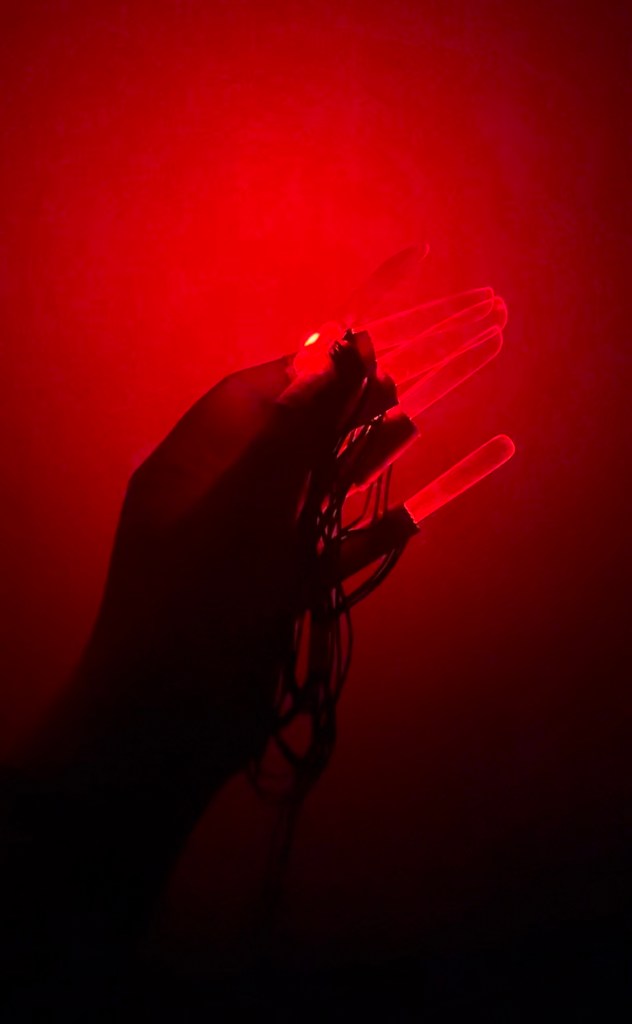
I made red nails that can “breathe”. Their light can change from dark to light and back again. I made these nails because I thought it would be fun to go out on Halloween wearing glowing red nails. I thought these finger covers are really easy to wear. During the process of making this project, I learned that LED lights easily broken and it is better to keep a few extra LED lights on hand for this type of project. If I were to recreate the project, I would like to make things that can use light strips, such as making lighted gloves. It took me a lot more time than I thought it would because the LEDs broke so often.

Materials and parts:

Nail covers: Band-Aid Waterproof Tape https://www.target.com/p/band-aid-waterproof-tape-10yd/-/A-84981790?ref=tgt_adv_xsp&AFID=google&fndsrc=tmnv&DFA=71700000105452574&CPNG=PLA_DVM%2Ba064R000011djVGQAY-J%26J_J3_Band-AidGoogleSearch_Feb_2023-861333&adgroup=PLA_J%26J&LID=700000001393753pgs&network=g&device=c&location=9067609&gclid=CjwKCAjwp8OpBhAFEiwAG7NaEr1VyDFidUZn3PfneWIa6r-ohtEsKBJ2127I9bnR8HTimG8SQb6EcRoC7xMQAvD_BwE&gclsrc=aw.ds

NeoPixel Mini Button PCB https://www.adafruit.com/product/1612

Acrylic Long Nail Tips https://www.amazon.com/gp/product/B09VL485SB/ref=ppx_yo_dt_b_asin_title_o00_s00?ie=UTF8&psc=1

Circuit diagram

https://www.tinkercad.com/things/7IDkNnKeJFA

Arduino code

Process:

1. Use Band-Aid Waterproof Tape to make ten finger cots.

2. Wire ten LEDs in series

3. Test

4. Stick them to the finger cover.

5. Glue acrylic nails to the finger cots (on the top of LEDs).

Carol’s Halloween Costume Process

My costume will focus on long light up nails. It basically includes a set of ten long nails. It works with many Halloween sets such as vampires, ghouls, mummies. etc. It’s intent is to scare people and add interest to a normal scary Halloween set.

Process:

Use Band-Aid Waterproof Tape to make ten finger cots.

Wire ten LEDs in series-in progress

Tinkercad circuit:

https://www.tinkercad.com/things/7IDkNnKeJFA

Specific supplies list: 

Band-Aid Waterproof Tape https://www.target.com/p/band-aid-waterproof-tape-10yd/-/A-84981790?ref=tgt_adv_xsp&AFID=google&fndsrc=tmnv&DFA=71700000105452574&CPNG=PLA_DVM%2Ba064R000011djVGQAY-J%26J_J3_Band-AidGoogleSearch_Feb_2023-861333&adgroup=PLA_J%26J&LID=700000001393753pgs&network=g&device=c&location=9067609&gclid=CjwKCAjwp8OpBhAFEiwAG7NaEr1VyDFidUZn3PfneWIa6r-ohtEsKBJ2127I9bnR8HTimG8SQb6EcRoC7xMQAvD_BwE&gclsrc=aw.ds

NeoPixel Mini Button PCB https://www.adafruit.com/product/1612

To do list: 

1. Wire the ten LEDs in series, and stick them to the finger cover at a certain angle.

2.Glue acrylic nails to the finger cots.

3.Refine the Arduino code, try to make more effects.

4. Test on the LED lights.

Carol’s Halloween Costume Idea

1. Costume description

My Halloween costume will focus on long light up nails. I will be gluing acrylic nails to gloves and then placing LED lights underneath the nails to illuminate them.

2. Arduino Technique: Fading LED

3. Materials and parts I may use:

NeoPixel Mini Button PCB https://www.adafruit.com/product/1612

NeoPixel RGBW Mini Button PCB – Pack of 10  https://www.adafruit.com/product/4776

Acrylic Long Nail Tips https://www.amazon.com/gp/product/B09VL485SB/ref=ppx_yo_dt_b_asin_title_o00_s00?ie=UTF8&psc=1

4. Circuit diagram

Carol’s Halloween Costume Proposals

Idea 1: things on body, like hem of a skirt.

I would use wire or a chicken coop as a skeleton and then glue paper or fabric over it. The lights would stay in place with the skeleton.

Idea2: some kind of claws.

I could probably buy ready made gloves, or make one out of gauze. Then make long nails out of cardstock paper, or wire and paper, and glue them together. The LEDs could be hidden in the nails.

Idea3: things to hold in hands, like a scepter.

I could make a scepter out of wood or paper and wire and hide the light in it.

Angel’s Wings Plush Night Light

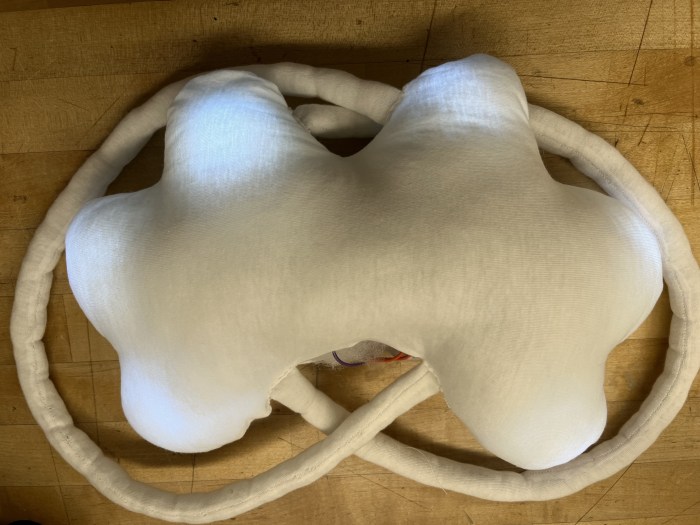
A photo of the completed project

My target users are people walking on the road at night, especially children. Walking on the road at night is very dangerous and easily be hit by a car. Therefore, I suggest wearing the night light I designed, which will make the wearer easily visible to drivers. Also, the glowing wings make the one who wears it look like an angel, creating a fairytale mood on a dark night.

Materials: cotton, cotton fabric, small light bulbs, wires and a battery pack.

For this project, I tried sewing LED lights into a plush toy to make the toy glow. I also tried sewing the straps into the wings. I think stuffing the cotton into the straps and sewing the straps into the body was the hardest. If I had more time, I would have strung more lights around the wings to make the outline of the wings glow.

Process:

1. First, connect the positive terminal of the LED to the 100 ohm resistor, then connect six LEDs in parallel.

2. Cut the pattern and iron the fabric to make it flat

3. Sew the straps and fill them with cotton.

4. Put the LED light and the battery box into the plush toy, sew the straps into the plush toy, and test the LED light to see if it lights up.

5. Seal all edges with white thread.