Tracker Teardowns

In 2024, we are constantly being tracked. What we buy, what we watch, where we go, who we talk to, what we say, what we listen to, where we travel, and what we Google; none of it is private. We sign up for all of this by carrying smartphones and logging into accounts when we make purchases. Why don’t we care about our privacy? I find this perplexing.

Today, I’m taking a look inside two tracking devices from our recent past:

  1. The Nike+iPod activity tracker, circa 2006; and
  2. an Object-tracking device, by an unknown manufacturer.

Before 👆

After 👇


  1. Nike+iPod Activity Tracker

Tools used in this teardown:

  • Precision Phillips head screwdriver
  • Precision Flat head screwdriver
  • Tweezers
  • Exacto blades
  • Push Pin
  • Sewing Pin
  • Hammer
  • Plasticine

I started with the Nike+iPod Nano activity tracker. Designed to fit into a special Nike+ sneaker insole, the device worked with an app on the iPod Nano which tracked speed, distance covered, calories burned, and provided a voice-over personal trainer experience for runners.

I tried to split the device open with a flat head screwdriver, then a push pin, then a smaller pin. No cigar. I did some searching and found this video suggesting a way to open the device, and bizarrely enough, I had a jewelry saw on hand, and so tried to use that to crack through the outer layer. It did not work. Then I found another video and tried a few different exacto blades as suggested, but wanted to avoid a trip to the ER so I found a very thin flat head screw driver and decided brute force was the only way: I stuck the device in plasticine to hold it firmly to the table, and then I jammed a flat head down into it and smashed on it with a hammer. That finally worked!

Here are all the tools I tried to use 😅:

Here’s what actually worked:


So, what’s inside the Nike+iPod Nano tracker?

In addition to the pieces listed below, there were many rubbery adhesive strips used to keep everything in place.

ComponentManufacturer and NumberMaterialPurpose
Outer shellhard plastic, high reflectivityencase the product
Reset Button (outer)soft, flexible siliconeencase the reset switch
Reset button (inner)hard plastic and metaltrigger the reset
Circuit boardmetal
BatteryPanasonic CR 2032 3Vpower source
Wireless TransmitterNordic Semiconductorultra-low-power wireless transmitter (talks to the iPod)
Micro chipPIC16F688mini computer
AntennaAntenova A10192hard plastic, metalconverts current into radio waves

For this device, the design choice that interested me most was the fact that it was so hard to open this sensor. There’s no way to recharge the battery, or replace it. You wont be surprised to learn that these were meant to be tossed out after the battery died, and replaced with a new one. At $29 a pop, with a 1000 mile battery life (approximately 1 year per Nike and Apple) the price for the tracker is reasonable. Considering that you can get a 5 pack of the Panasonic 3V batteries for $3.29, I wonder what the additional cost would be to make a tracker where the battery replaceable. Would more plastic required? Would a larger insole be needed?

The Nike+iPod product evolved along with Apple products, but this specific form-factor has been retired.


2. Moving on to to “Tile” Type Device

Tools used in this teardown:

  • Precision Phillips head screwdriver
  • Precision Flat head screwdriver
  • Tweezers

This device is fairly simple as well, and only had a few parts:

Here’s what makes up the “Tile-type” tracker:

ComponentManufacturer and NumberMaterialPurpose
Outer shell/caseHard plastic, low reflectivity, paintedencase the product
Battery capHard plastic, low reflectivity, paintedallow battery replacement
Light cap?hard, clear, frostedI didnt’ find an LED so I’m not sure what this is for!!
“D” Ringhard plasticused to attach object
BatteryPanasonic CR 2032 3Vpower source
System-on-ChipTexas Instruments CC2541micro-controller
Circuit boardFP E204460 / M11 94V-0
Date stickerset for 8/2014identify approximate date of manufacture
AntennaAntenova A10192converts current into radio waves

For this design, the most interesting piece was the small, white/clear, semi-opaque piece of plastic that was found at the corner of the device. It seems like a cap to close the case, but also to allow light to pass through. However, as this isn’t a device to actively turn on and therefore doesn’t need a light to indicate whether its on or off, AND the fact that I didn’t find a light/LED in the device, I wonder what the point of it is. It doesn’t add functional or aesthetic value… and yet it was included.


All in all, this was a great exercise, I enjoyed cracking these devices open and taking a look at what was inside. Looking forward to learning more about how all of the parts work together this week!

Amazon Kindle 2 Teardown

Introduction

Hi! I am taking down the Amazon Kindle 2 for the Teardown Project for the MakingStudio Course. I have never torn a device down before so this will be interesting.

Tools used

Flathead screwdriver (1)
Precision Screwdriver 50mm (2)
Knife (3)
Plier (4)

Procedure

To get the gray case off, use the flathead screwdriver to get in between the gaps.
To take the steel case off, remove two screws with the precision screwdriver.
With the precision screwdriver, remove all of the screws (20)
Proceed to remove the lithium battery.
Remove the white case.
Under the white case, remove the screws.
Remove the wire from the 3G module
Lift up the brown part.
With a plier remove the connections.
Do that for all of the connections.
Remove the case.
Open and remove the card.
Turn around the board.
This is what it looks like under the screen.
Take the metal pieces off with a knife.
This is what it looks like on the inside.
This is the complete teardown.

Materials/Observation

List and information about the materials in the Kindle.

[1] Casing

I suspect that the casing is made of PP plastic, however, I can not confirm this whereas Amazon does not disclose this kind of information.

[2] Philip Screws

Purpose: To screw things together

[2] Philip Screw

Count: 22 + 4

Serial Number: EY21

Manufacturer: Unknown

Material: Steel

Type: Flathead Philip Screws (EY21)

[3] Lithium Battery

Purpose: To power up the device

[3] Lithium Battery

Type: Lithium Polymer Battery

Serial Number: S11S01B

SKU #: PRB-36

Charge: 3.7V

Capacity: 1530 mAh (milliampere hour)

Dimensions: 2.58 x 2.09 x 0.2 inches

Weight: 1.9 oz

[4] 3G Module

Purpose: Allows a wireless (3G) connection

[4] 3G Module

Model Number: DTP-600W

Serial Number: 0642592

Manufacturer: AnyData

Download Speed: 3.6 Mbps (megabits per second)

Upload Speed: 387 Kbps (kilobits per second)

Dimensions: 51 x 30 x 4.5 mm

[5] SIM Card

Purpose: Allows a wireless (3G) connection

[4] SIM Card

Manufacturer: Orbethur

Dimensions: 15x25x0.76 mm

[4] Screen

Purpose: Allows a display

[5] Screen

Model Number: ED060SC4

Manufacturer: Prime View International

Pixels: 800 x 600

Manufacturer: Unknown

Weight: 35 g

Dimensions: 137.9 x 104.1 x 1.18 mm

[7] Mother Board

[4] 3G Module

Purpose: Allows connections and functions for the Kindle

Model Number: Unknown

Serial Number: sp01216a2twn

Manufacturer: Lab126 (Amazon)

Items I found in the Mother board

[7.1] Power Management Chip

Purpose: Allows battery connection

Model Number: MC13783VK5

Manufacturer: NXP

Output: 500 uA (micro Amper)

Voltage: 4.65 V (Volts)

[7.2] Mobile MDDR Chip

Purpose: Allows mobile connection

Model Number: K4X1G323PE-8GC6

Manufacturer: Samsung

Density: 1 GB

Voltage: 1.9 V

[7.3] Collector-Emitter Breakdown Voltage Chip

Purpose: “The VC at which a specified IC flows, with the base open. -“https://www.tek.com/en/support/faqs/how-do-i-test-bipolar-transistor-collector-emitter-breakdown-voltage-my-curve-tracer

Model Number: D135211B3

Manufacturer: EPSON

Kynix Number: KY962-D135211B3

Voltage: 1.9 V

[7.4] Unknown Items

I tried to look up the other items in the motherboard but did not find any datasheets or get any clues as to what it might be. However looking at previous Kindle 2 teardowns it seem that the items are:

  • USB transceiver
  • Main processor (Freescale chip)
  • Flash Memory and Controller

Manufacturing Techniques/Equipment

It was kind of hard to find the manufacturing techniques whereas Amazon does not want to disclose any information on how their products are made. I see that Amazon does not produce everything on its own, f.e. it uses stuff from AnyData, Samsung, NXP, Epson, and more companies. Some manufacturing techniques I found were the factory quantity packaging for the Power Management Chip is 240 at a time, which means you have to order 240 chips at once. I also found out that the chips are AEC-Q100 qualified which means that they have passed specific tests.

Conclusion

What interested me most about the teardown was how nice the battery looked even though it’s not meant to be seen. I also like how the connections are made from plastic strips instead of wires. It makes everything so seamless.

I am not sure why the battery looks this nice and has these fun details whereas they are not meant to be seen, however, it could be to sell Amazon the product but not the consumers. I think there are no wires because I think they are not as reliable as the plastic strips.

This was a very interesting project as I got to teardown and see what makes a high product. I wish that I had taken a video but I did my teardown in two parts, I will consider doing a video if I do a teardown again 🙂 Thank you for reading through!

Bowers and Wilkins headphones

I chose to tear down a pair of Bowers and Wilkins headphones! here I included an image of them brand new from online because I got too excited to rip it apart and forgot t0 take a before picture. here they are 🙂

Tools and Techniques

I found that I used my hands for most of this process but used a few tools to aid in taking things apart. Looking back the only tools that I used were my hands, an x-acto blade, and the smallest screw driver I could find. My goal was to separate the headphones so every thing I removed was one single piece, and I wanted to do so without having to break anything.

Because I was able to use my hands for most of this demolition most of my technique was really pulling on things to see if they would come apart.

I started off almost immediately by using an x-acto blade to seam rip the stitching on the leather that covered the headband. After that it became much easier to deconstruct what was inside the headband. After that I worked on it piece by piece and when I got stuck I moved onto a different section. Usually taking apart one section ended up helping me break free another piece

timelapse of me working!

The only part that I used the screw driver for was inside the ear cushion and the ear cups themselves. In here, there were parts of plastic that were screwed down to hide the battery and the motherboard. Other than that I worked through the whole thing using my hands and the x-acto blade to pry things apart. This is a small timelapse of me working and moving around a lot from part to part. After trying to get the whole headphone wire out I realized it was much further in than I thought and then my screw driver was too big. It was a lot of trial and error but I really did enjoy the process

a look at the inside of the ear cup with the speaker

Materials

headband:

  • leather
  • foam
  • metal headband base
  • headphone cable
  • rubber

ear cups:

  • motherboard
  • metal
  • wires
  • battery
  • plastic
  • screws
  • speaker
  • foam
  • leather
  • magnets
  • rubber
all of the different pieces in a big pile 🙂

Manufacturing Techniques

There are a few steps in the manufacturing process of over the ear headphones

Selection of materials

  • Plastics are used for the outer casing due to their lightweight and moldability
  • Metals such as aluminum and stainless steel are for structural components, providing strength and durability
  • Foams and Fabrics are for ear pads and headbands to ensure comfort
  • Magnets and Voice Coils are key components in the drivers that convert electrical signals into sound

    Manufacturing the Components

    • Driver Assembly: The driver is the heart of the headphone, consisting of a diaphragm, voice coil, and magnet
    • Molding and Casting: The plastic and metal parts are molded and cast into the required shapes using injection molding and die-casting techniques
    • Circuit Board Production: The electronic components, including the circuit board, are manufactured and tested

    Assembly

    • Drivers are carefully installed into the ear cups
    • Internal wiring connects the drivers to the audio jack or wireless module
    • The outer casing is assembled, and ear pads and headbands are attached
    • Each unit undergoes rigorous testing for sound quality, durability, and functionality. This includes acoustic testing, drop tests, and stress tests

        https://app.t2.world/article/cly2xko3f96701520mcbiqsjtvc

        Knolling

        This was by far my favorite part of the process. After I finished tearing the headphones apart I dumped the pieces out of my bag and got to work!

        final teardown!

        Design Elements

        One design element I really liked was that the leather ear cushion and plastic ear cup each had strong magnets that allowed them to stick together well but also be pulled apart fairly easily if needed. I have never owned a pair of over the ear headphones before so I don’t know if this is a common feature but I’ve seen other headphone users have to peel off the cushion to get it off, which makes it harder to put back on in my opinion. I think Bowers and Wilkins made it this way so that the leather could be easily replaced when it wears down and the inside mechanisms could be easily accessed if the headphones need repairs.

        Another design element that intrigued me was the metal engraved indication of the left and the right headphones. On most headphones now a days it is written somewhere on the cushion or cup but these had a tiny separate metal piece on the metal base that said L and R. When taking it apart I thought it was interesting that these were two cylinders that could be separated from the whole form. The reason for the left and right indication is so the user can hear the stereo properly. The sound is frequently captured with two or more microphones, each of which captures a different segment of the audio, so you need the headphones on the right way otherwise all the sounds will be reversed.

        Tablet Computer with a keyboard Teardown

        Overall looks:

        Keyboard:

        I teared down the keyboard first with my hand and screw driver. This part is really loose and everything can be separated easily.

        Picture 1: Finished

        Picture 2: In detail

        Generally, there are seven parts in the keyboard.

        Parts Name

        Materials

        Manufacturing method

        keyboard Case (black)

        Plastic

        Injection molding

        Keyboard Plate (black)

        Plastic

        Injection molding

        PCB (Printed Circuit Board)

        Glass fiber with copper traces, Plastic, Rubber

        Photoengraving, injection molding for plastic and rubber

        Battery

        Stabilizer (small white)

        Plastic

        Injection molding

        screws

        steel

        Cold forming, Hot forging, Machining

        Keycaps

        Plastic

        Injection molding

        PCB processes the inputs from the key switches and sends them to the computer. key board case and plate are used for supporting and holding all the components including the keycaps. Stabilizers are used for stable the keycaps while you pressing them. Usually, the keyboards have mechanical switches looks like this:

        For my keyboard, I think they are replaced by the little deformable rubber buttons on the PCB. Keycaps for pressing and screws are used for fixing.

        Tablet Computer:

        Then, I move to the tablet computer. And the tools are also hands and screw driver. This part is little bit hard to tear down as some screws are in bad conditions.

        Picture 1 starting:

        Picture 2: Finished

        Parts Name

        Materials

        Manufacturing Method

        Mother board PCB: PCB for charging and speaker:

        Copper, Composite Epoxy Material (Low cost and single layer PCB), Polymide

        Silkscreen (for fronts on the board), Photolithography Electroplating and Electroless Plating, Surface mount technology

        Speaker Dock

        Plastic

        injection molding

        Front face camera

        Optical glass, plastic (for casing)

        precision molding, injection molding (for casing)

        Li-ion: Battery

        Graphite, Lithium Cobalt Oxide, Aluminum or Stainless Steel (for casing), Polypropylene (PP)(for separator),

        one fluid motion: mixing, coating, drying, stacking, winding

        Touch screen

        Glass

        Laser cutting

        Connection wires

        copper

        stranding, Insulation and Shielding

        PCBs that contains ICs on them in the computer are used for receiving, processing, and sending the electric information from the sensors.

        There are a lot of chips within: Qualcomm PM8921 Power Supply Management IC Chip EDJ4216EFBG-GNL-F Integrated circuits chip SlimPort ANX7688 is an ultra-low power 4K Ultra-HD (4096x2160p60) mobile HD transmitter designed for portable devices

        Tools and techniques: Strong hands and a small screw driver

        Two special Items:

        Special PCB for the keyboard: What makes its special is that the one part of this PCB is made of Plastic and rubber instead of the metal and its combine the mechanical switches with the board, which results in saving of the space and the keyboard looks small and has light weight for carrying and using. And the rubber provides a very good user experience when you use keyboard as there is almost no noise.

        Stabilizer for the keycaps: I think the stabilizers are fixed in a very thin and stable way under the keycaps. The intention of the designer can also be saving spaces and reduce weight.

        Thanks For Watching :))))))

        Pentax Espio 80 breakdown 

        Tools used: precision screwdriver, precision pliers.

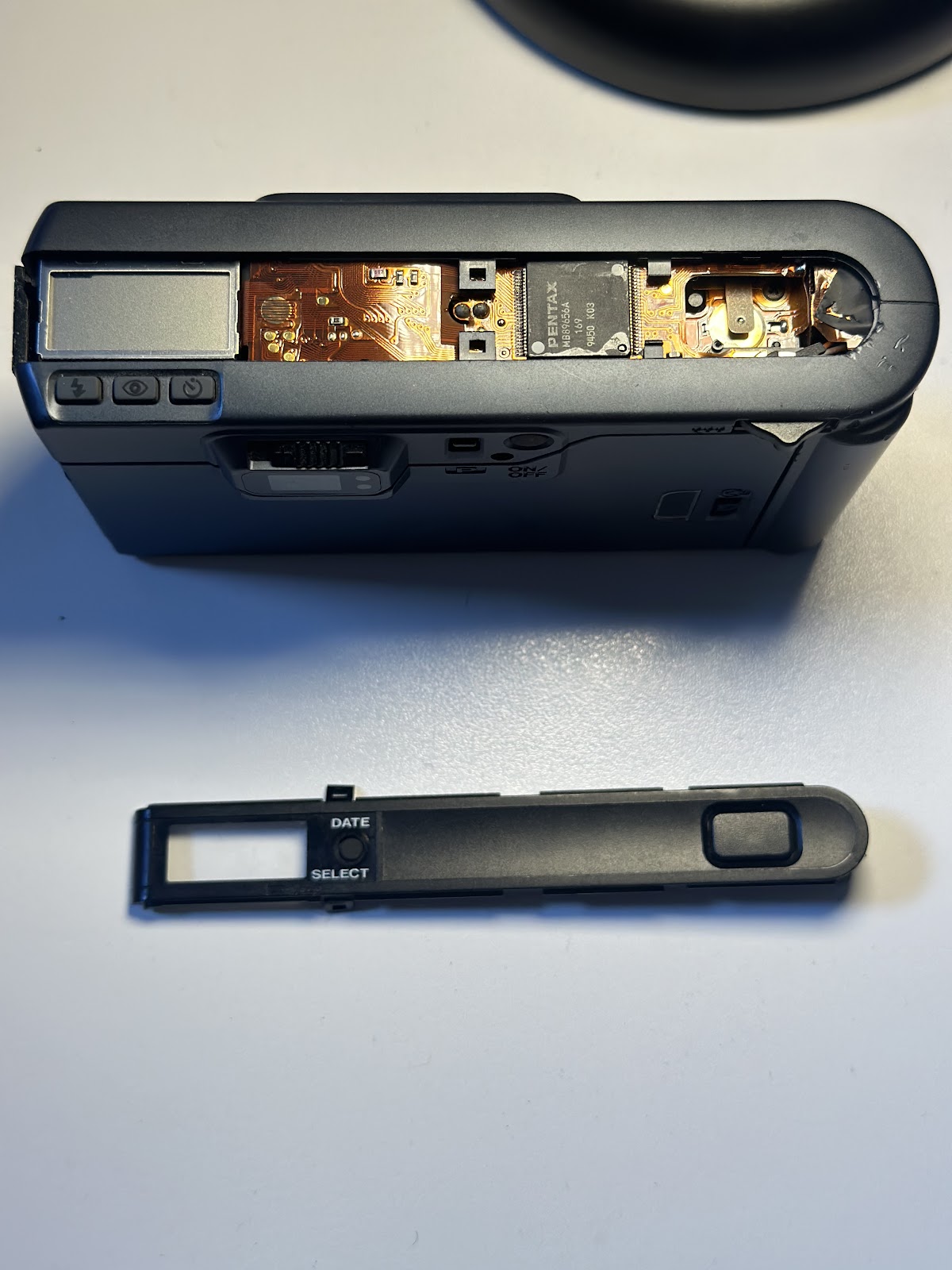
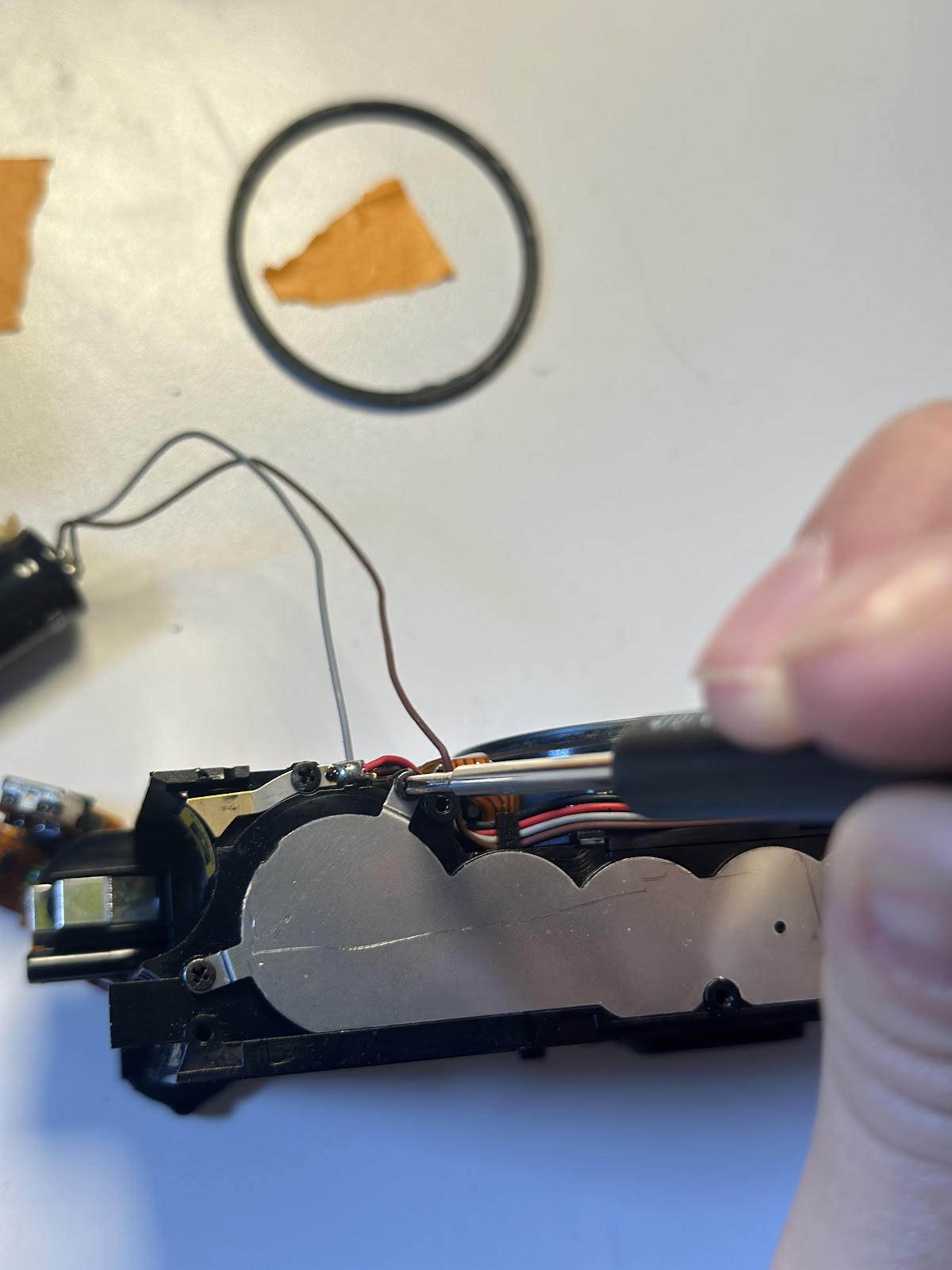
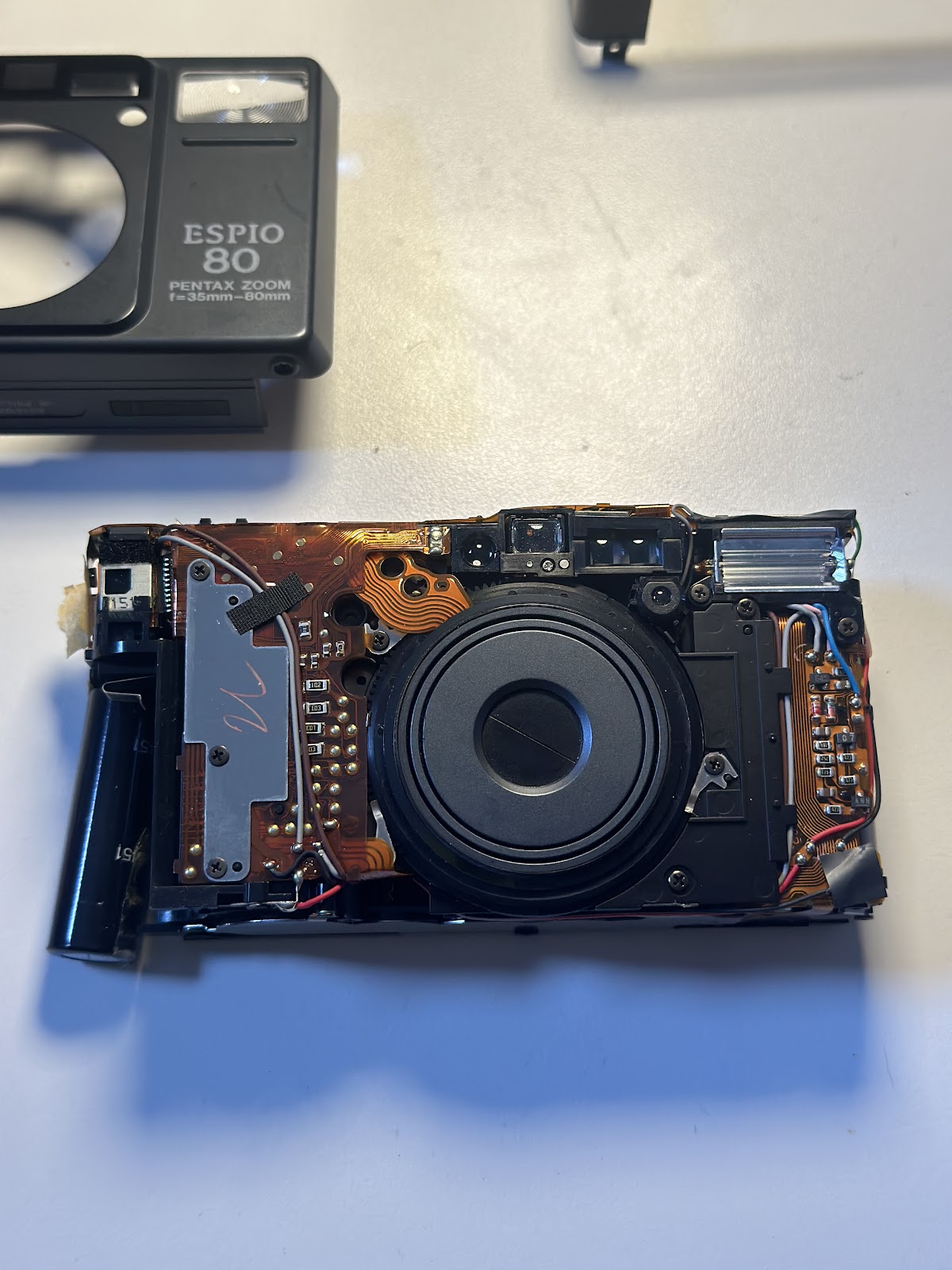
        My approach to this teardown was to keep everything as intact as I could. I removed the screws and gently pried the plastic pieces away one by one. I also had to thread the PCB through the parts as I removed it. My biggest takeaway and disappointment was how this camera (like other electronic point and shoots) is manufactured to not be repairable. the way the pieces are stacked, and the PCB is layered, it’s not possible to access certain pieces without destroying others. That being said, the PCB was most impressive to me because it was a single piece woven throughout the different sections and mechanisms of the camera.

        I began the teardown by removing the plastic frame pieces.

        I then proceeded to loosen the pieces inside the camera that were blocking access to the circuitry. 

        Including removing the gear cover plate 

        Then I removed the circuitry for the flash 

        And the rest of the internet circuitry 

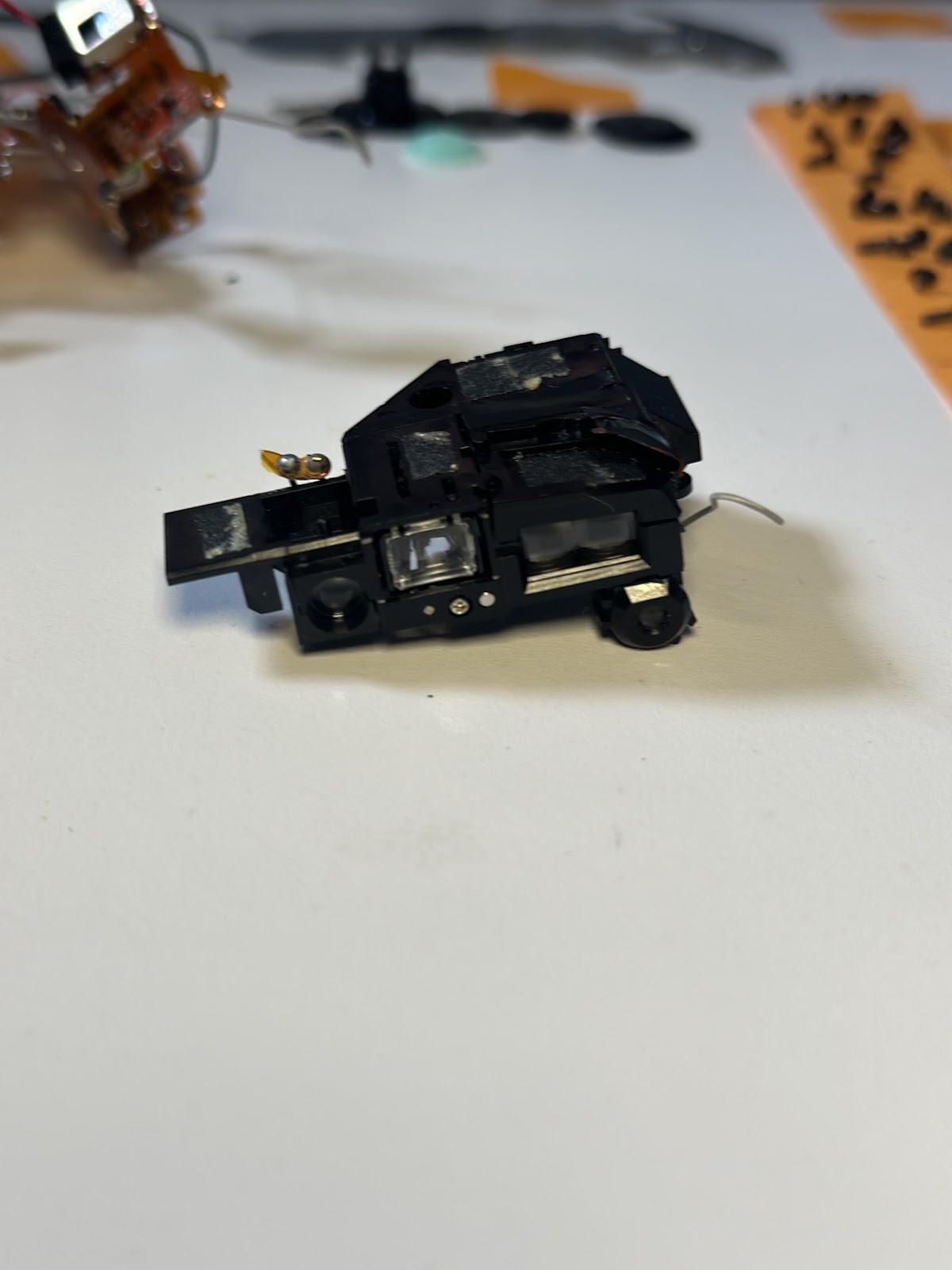
        After I removed the PCB, I could access the rest of the internal mechanics of the camera. So I then separated out the film winding mechanism: 

        The shutter/zoom lens:

        And the viewfinder, which completed the tear down:

        PARTMATERIALMANUFACTURING PROCESS
        Top plateplasticInjection molding
        Exterior body bracket plasticInjection molding
        Backdoor plasticInjection molding 
        Front plateplasticInjection molding 
        Gear cover plateAluminum Die casting 
        gearsplasticInjection molding
        Internal shutter triggerplastic/metalInjection moulding/die casting
        Flex circuit (PCB)copper/acrylicplating/boding/baking 
        LCD screenglass/aluminummolding/bonding
        Microcontroller 
        Lithium-ion battery (for flash)
        Semiconductor 
        Motor (for shutter)

        ZTE Teardown

        Tools: Phillips and flathead precision screwdriver

        Step 1: Opened the back of phone, and removed the battery

        Step 2: Used Phillips and flathead precision screwdriver to remove all screws on the back of phone

        Step 3: Removed camera and microsd card

        Step 4: Used screwdriver to lift off back, which revealed the wiring and a very strange smell 🤨

        Takeaway: It was interesting to see how many moving parts there are within such a small device. I’ve always been curious as to what exactly are the components allowing us to view images, make a call, save data… Doing this experiment has certainly piqued my interest even more than before.

        Kidde Smoke & Carbon Monoxide Detector  Teardown


        I got this fire alarm, which is very common in people’s lives. In fact, I even have one of the same brand in my room. This made me curious about its internal structure and how it operates.Let’s do this!

        The tools used

        • Needle-nose pliers
        • flathead screwdriver
        • Phillips screwdriver

        Teardown steps

        1.Remove the battery cover

        2.Use a flathead wrench to remove the alarm cover

        3.Use a Phillips screwdriver to remove the circuit board and speaker.And that’s it!

        The materials used for each component

        componentmaterialtechniques/equipment
        Main Circuit BoardEpoxy resin, copper, electronic componentsPCB fabrication, etching, soldering
        Smoke Detector SensorPhotoelectric sensors, semiconductorsSensor assembly, integration of photodiodes
        CO Detector SensorElectrochemical cellsElectrochemical assembly, electrode preparation
        SpeakerPlastic, magnet, diaphragmInjection molding, assembly, tuning
        Battery CompartmentPlasticInjection molding
        Test/Reset ButtonPlasticInjection molding
        Indicator LightLED, plastic lensLED assembly, plastic molding
        Mounting BasePlasticInjection molding
        Alarm HousingPlasticInjection molding

        Chips

        PCBA2544-9782A FW 2544-5?81 B 011015 ??

        Design elements

        1.I think the structural design of the alarm is very easy to install and use. The user interface is simple and clear, consisting of a speaker (for alarm sounds) and LED lights. The alarm sound or signal is sufficiently noticeable to ensure it can be easily detected in emergency situations.

        2.The Kidde alarm integrates smoke detection and carbon monoxide detection into a single unit. It uses an ionization sensor to detect fires and an electrochemical sensor to detect carbon monoxide. This combination provides a more comprehensive response to the two main hazards in a home.(Specific details are provided by Amazon)

        Lomi Massage Gun Tear Down!

        Welcome to the tear down of the Lomi Massage Gun! It is your average 30 dollar massage gun from Walmart. I was excited to figure out how something so uniquely shaped on the outside would look on the inside.

        TOOLS:

        • Small Phillips Head Screwdriver

        To start, I observed six screws on the outside of the gun and unscrewed all of them. The massage gun popped right open, and I was able to carefully take out all of the parts.

        Turns out, there are not that many parts inside, making the outside more complex than the inside.

        PARTS:

        • 3 Different Plastic Massage Heads
        • 7 Small Metal Screws

        • 1 Massage Control Board (AKA Motherboard)
        • 1 Micro USB Battery
        • 1 DC Motor
        • 1 Silicone Power Button
        • 1 Massage Gun Plastic Shell

        DESIGN CHOICES

        • The massage heads are interchangeable using a Push-and-Pull Mechanism. This allows for ease of use, reliable products, cost effectiveness, and any other push-and-pull head can be inserted into the gun.
        • The Massage Control Board was secured in place at the top of the gun by slipping between two plastic ledges that held it. This was interesting because the battery and motor were really heavy, and would crush the motherboard if it was on the bottom.

        JBL Speaker Teardown

        Teardown Process

        The JBL Speaker looks very seamlessly integrated from outside with zero screws. So I used a file and a hammer to pry the curved perforated metal front off to examine further.

        I broke off the soft silicon pads on the bottom of the speaker and smashed open one end.

        I tried to pry off buttons from the other end to reveal inner structures, then used it as a breaking point to pry open the exterior shell. The exterior shells turned out to have three layers and screwed to the black inner part in an invisible way (screws were hidden behind the two round pads at the ends).

        Breaking down the innermost part was very painstaking. I first unscrewed all the screws I could find only to realize the halves of this chunk seems tightly glued along the middle line. I tried to pry it open from multiple angles with no luck. Inspired from the teardown videos of other JBL speakers, I managed to find a hidden screw located at the central back and via here was finally able to break it open.

        Here’s what’s at the heart of the JBL Speaker: a tube, some damping foams, two speaker drivers, one main circuit board, and one lithium battery underneath.

        Here’s the final look from the JBL teardown with labeling.

        Two Interesting Designs

        1. Bass Reflex Tube
          • How it works: when the speaker is on, the speaker drivers push air through the tube to the outside. The shape of the tube is also carefully designed to resonate in a way that boosts lower frequencies and improves bass response.
        2. Three-Layer Outer Shell
          • The three layers tightly bind with one another and add extra colors & textures to the speaker’s exteriors. They also provide stronger binding for the relatively delicate inner part and protect it from potential impacts. I also think their particular shape acts as a weight balance for the speaker to stay flat on the table with the perforated steel front always facing forward.

        Tools & Techniques during Teardown

        ToolsTechniques
        Pliers of different sizesScrewing/Unscrewing
        Cutting plierPrying
        Files of different sizesSmashing (attempted)
        Philips screwdriver

        Component & Material & Manufacturing

        ComponentMaterialManufacturing Technique
        Perforated Steel FrontPerforated SteelSheet Metal Punching, Stamping
        Outer Shell (Three-layered)Plastic (ABS/Polycarbonate)Injection Molding
        Round End CapsPlastic (ABS or Polycarbonate) with Rubber InsertsInjection Molding, Overmolding
        Speaker DriversDiaphragm: Mylar/Polypropylene, Frame: Metal (Steel/Aluminum)Stamping, Thermoforming
        Passive RadiatorRubber, Metal DiscRubber Molding, Stamping
        Bass Reflex TubePlastic (Polycarbonate or ABS)Injection Molding
        Main Circuit BoardFiberglass (FR4), Copper TracesPCB Manufacturing, Surface Mount Technology (SMT)
        BatteryLithium-ion, Plastic casingCell Manufacturing, Ultrasonic Welding
        Wires and ConnectorsCopper, Plastic Insulation (PVC)Wire Extrusion, Connector Assembly
        Acoustic Foam/Damping MaterialsFoam (Polyurethane or Polyethylene)Foam Extrusion or Molding
        Buttons and Control InterfaceRubber (Silicone), Plastic (ABS)Compression Molding, Injection Molding

        DVD Writer Model teardown

        1. I removed the four screws on the back panel and lifted off the casing to expose the internal components.
        2. The disc tray was stuck inside, which I suspect was one of the reasons for the device’s failure. I forcibly removed the tray from the housing.
        3. Next, I unscrewed the board connected to the charging port and separated it from the main logic board of the DVD Writer.
        4. I then removed the circuit board near the charging port, which seems to be responsible for charging functions. I detached the FFC/FPC cable (Flexible Flat Cable/Flexible Printed Circuit) connecting this board to the main DVD circuit board. The cable was plastic-like and difficult to remove, so I cut it in two.
        5. I took out the metal plate attached to the main structure of the DVD writer. This plate was used to secure the internal components and prevent them from moving. Some screws were difficult to remove, so I forcibly took them out.
        6. I removed the spring mechanism responsible for ejecting the DVD tray. It was jammed inside, but only required unscrewing one easily accessible screw.
        7. I removed a FFC/FPC cable, a long metallic strip used to connect circuit boards. Additionally, I removed some nearby PCB mounts or clips used to secure the circuit board.
        8. I detached the upper part of the spindle motor assembly, which is responsible for rotating the disc. I also removed the associated control PCB.
        9. Lastly, I removed the spindle motor and its mechanical components, which drive the disc’s rotation within the DVD Writer.(As shown in the figure below)

        Part

        MaterialManufacturing Process
        Back panel casingPlastic PCInjection molding (plastic), stamping or casting (metal).
        Disc trayPlastic ABSInjection molding.
        Charging port circuit boardFiberglassPrinted circuit board (PCB) fabrication, electroplating.
        Main logic board / Main circuit boardFiberglassPCB manufacturing, surface-mount technology (SMT).
        FFC/FPC cableCopper conductorsCircuit etching, lamination.
        Metal plate for securing componentsSteel or aluminum.Stamping, laser cutting
        DVD tray spring mechanismStainless steelBending, coiling.
        PCB mounts or clipsPlasticInjection molding (plastic), stamping
        Spindle motor assemblyMetalTurning, injection molding, winding process (for motor).
        Control PCB (Printed Circuit Board)FiberglassPCB fabrication, surface-mount technology (SMT).
        Spindle motorCopper wire, steel shaft, iron core, plastic housing.Winding process, stamping (motor core), injection molding.
        Mechanical componentsSteel, stainless steel, plastic.Stamping, injection molding, turning, laser cutting.

        I find the internal structure of this device particularly intriguing because of its compact and portable size, which leads to a very tight arrangement of components. To maximize space efficiency, the spring mechanism is cleverly shaped to conform to the central structure.