The IoT mood tracker is a device that provides feedback to student advisors on how a group of students is feeling. Graduate school can be extremely challenging. Sometimes it gets so bad that students get burned out. What if student advisors knew that students were not doing well before they reached the burnout stage?
The IoT Mood tracker uses a suite of Adafruit products, Adafruit IO and IFTTT to invite passersby to hit a physical thumbs up, thumbs down, or thumb level that represents the mood they are feeling. When any one thumb has been pressed a certain amount of times, the device sends an email to a student advisor.
Have you ever got burnt out with schoolwork? This IoT Mood Tracker helps student advisors know how a student cohort is doing through out the semester in order to keep burnout at bay. The device uses thumb-shaped buttons, electronics and the internet to record student moods and relay the information to school administrators.
Inspired by my friends’ tradition of calling each other at exactly 12 midnight on their birthdays, I developed this product out of guilt of missing out on this tiny but precious practice. To make it worse, due to the time difference, I have been calling my friends either too early or too late to wish Happy Birthday. This simple product is a gag gift to give your forgetful friend.
From smog hanging over cities to smoke from wildfire, air pollution poses a major threat to our health. Visibility is easily impacted by air pollution. As we have more and more bad air days, we get more of blurry, hazy vision.
Using Visibility as an Indicator for Air Quality
We always use colors to indicate the air quality. In this concept, I added one more visual element—the visibility.
It has 4 layers of mountains which are made of acrylic sheets and 5 row of LED strips which light up the mountains and the wall behind it.
Not just color of the LED but also the number of lit LED strips constantly change, depending on the air quality. For instance, when the air quality is terrible, only the first row of LED turns on in red and all you can see is the silhouette of the first mountain.
i made, what i call, “street art magic” — a physical/digital spray can
essentially it’s a symbol for the use of spray cans and their connection to street art in the digital age.
this one works as a can, or trigger, for the acrylic tag that i constructed to become a light. the use case would be someone who is a fan of graffiti and just wants a novel spray can that lights up a tag; however, it would be great for the setup to be used as a communication tool for young artists to non-verbally communicate when they arrive hone after a night on the streets. Being that Huzzahs are [going to be] used, the cans can trigger lights that are remote (another town, city, state) by using WiFi.
overall the process was undulant but the challenges made it worthwhile in the end. currently the product and video, themselves, are only a work-in-progress, due to challenging software/hardware interface issues. the current production uses acrylic to display the tag and diffuse light, with a 3D printed casing to wall mount and house the neopixel strip.
this seems like an appropriate time, so the materials are as follows:
2 acrylic sheets (fill and outline)
3D printed case
315/433mhz RF transmitter/receiver (if wanting to create a local remote to trigger)
Arduino Gemma (if wired version, current prototype)
Arduino Huzzah (if WiFi version, to interface with others)
Arduino Huzzah/Metro (if using RF transmitters, for a local remote trigger)
Dozen (approximately) pvc coated wires
Neopixel strip
External Battery
Button
In using the materials, I tried to manage my time efficiently so I could work on the various pieces of the project concurrently. Almost all software and hardware resulted of new endeavors, but it wasn’t too overwhelming (other than the RF module being defective).
Process photos and explanation:
Wiring photo (RF attempts, Current modified button cycler, and Huzzah); Tag sketch (in notepad); Laser Cutter; 3D model for case
Overall I’m satisfied with the current state of the project, but my next steps for the near-future iterations will use both the RF module and Arduino Huzzah (for the local, and/or remote LED triggering spray cans).
Final video
Various mini pieces within the video, it’s use case, and a snippet of the product in-use.
We are dogs’ biggest enemy and we are here to save pet owners.
What do dogs get excited about besides playing fetch? The answer is food. They would eat anything. So don’t you hate to see your dog stealing snacks from the food cabin? It is almost like your money getting stolen by your child at home. Nobody likes that.
Lightbox is an interior decor that serves as your food cabin guard with an “implanted” buzzer, a movement sensor, and surrounding lights. When the dog approaches the Lightbox, the sensor will sense movement and enable the buzzer to activate and the light to change color as a way to warn and scare away your greedy dog.
Since it’s a different time all around the world, it gets very difficult to track down what time to call my parents or what time to watch the soccer game live from the UK. With this timezone clock- you are able to press on a specific country, and it will display the time in that country.
Living in the U.S has made me realize how many of my shows and soccer games I was missing so I designed this timezone world lamp to help me know what time it is in another country.
Understanding Spheres & 2D Patterns.
By comparing a map and a globe, I realized that a 2D pattern would not make sense in a 3D globe. The geography looks totally different between the two because spheres are deceptively simple. I tried multiple spheres patterns to test out how it would fit on a globe.
Essentially, it’s mathematically impossible to get the visuals from a globe to lie distortion free in a rectangular 2D pattern. To calculate the size of the print, i sized the circumference of the globe to match longitudinally to the size of the pattern.
To replicate this pattern onto any spheres, measure the diameter of the globe and then scale the length of the pattern to match the diameter.
Building the Circuit
For the capacitive touch sensor, I used the 8-Key Capacitive Touch Sensor Breakout. Using the instructions from the Adafruit website, I was able to wire up and use the test code instructions. For the screen display, I used the Standard LCD 16×2. Test both the
Because I am using two i2c devices, I had to change the address for one of them. We do this to connect a bridge to the solder pads. The diagram on Adafruit shows how to perform this carefully. The code also needs to match so we need to adjust it accordingly.
Now we can connect the data and clock lines in parallel. The diagram shows it with two different i2c devices but with a different microcontroller board.
Every music lover desires a stage, but not everyone has a stage, and not everyone likes to participate in that kind of public stage. I want to create a new experience for music lovers. Whether it is practicing musical instruments, karaoke, or playing music, the stage will change different effects according to the rhythm. Everyone can have their own music stage!
Designers spend time on matching colors. However, the best matching inspirations sometimes come from the nature around us. The lamp is designed to help designers get objects’ RGB color. (See details in Instructables)
Process
Step 1 – Ideation
Project started from concept ideation. I created ideas from abstract shapes to realistic products. Sketching will help you to visualize ideas flying in your head. Meanwhile, you can also find “smart product project” online for getting creative inspirations. The channels related to smart object, physical computing, IoT, etc are listed below:
Once you get clear idea of concept, you can start making a shopping list. Before you go to check, make sure all the parts are available with each other. I recommend you to buy circuit on Adafruit, which has clear spec and instruction.
When soldering components together, remember to differentiate channels with different colors. The circuit I designed having Uno, color sensor, neopixel strip, and photoresistor.
Black – Uno Ground + Color sensor Ground + Neopixel Ground + Photoresistor Round
Red – Uno 5v + Color sensor VIN + Neopixel 5v + Photoresistor Positive
Yellow – Uno SCL + Color sensor SCL
Blue – Huzzah SDA + Color sensor SDA
White – pin for Photoresistor
Green – pin number for Neopixel
Step 4 – Physical Structure
Cutting basal foam for making structure and hiding circuit. Using solid ring wood piece as the base of Neopixel strip.
Step 5 – Finalize
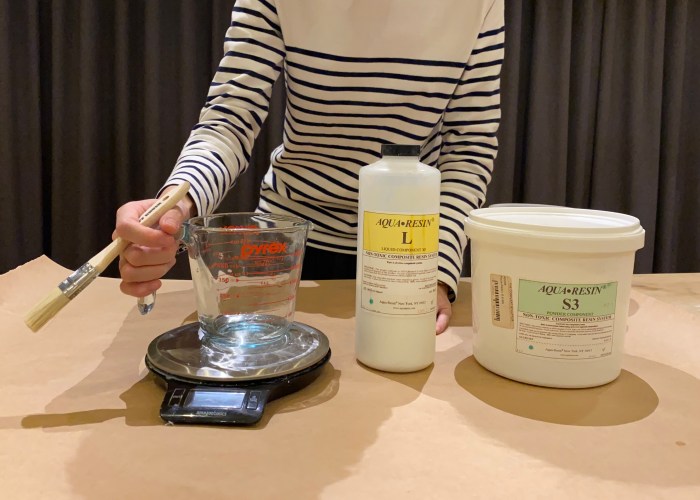
In order to get smooth and high-quality texture of product surface, I used aqua resin(the most typical mix ratios of liquid and powder are 1:3 by weight or 1:2 by volume) to coat the balsa foam and sanded with sanding paper.
Next Step
In order to using color efficently, the next step will use Huzzah instead of Uno and send objects’ RGB Decimal Code to users through the internet.
It is normal that school is challenging and, at times, deeply so! But sometimes things really do get out of control, and students, unable to communicate to their teachers and advisors how they are feeling, can fall over the edge. It is at this point–when students are burnt out, sleep deprived, and even physically ill, that the institution notices that it’s time for a change.
We believe this is an issue of feedback delay. What if teachers and academic advisors knew before it is too late, that school life for students is going downhill? What if there was a way to stop the burn out and misery before it happened?
The Concept
Preliminary Sketch
The mood tracker is inspired by the notion of checking in on how a group of people are doing using “thumbs” as a visual cue. An upward, side, or downward-pointing thumb signifies a good, ok, or bad emotional state, respectively 👍👎
When a students punch in their mood on the tracker, the tracker tallies up the number of presses for each button. When any one button reaches 20 presses, the tracker sends data to an internet feed, which in turn triggers an email to the academic advisor announcing the student status.
Let’s See It In Action
Product in use
This product is designed to help academic advisors to know how a student cohort is doing on a daily or weekly basis, so that they can take action when needed.
Research
The concept of of checking in date back to the 1960’s practice of punching. -in at work.
Our mood tracker bears a core resemblance to the standing satisfaction booths in airport bathrooms and stadiums.
However, our product goes further in that it is not so much an endless vessel for feedback, but an alert system that is triggered at specific moments to help educational institutions and staff know when to check in with their students.
The Neumann study found emotional exhaustion and lack of felt accomplishment are ingredients of the burnout process. Therefore, Emotional fatigue greatly influences student performance and affects personal commitment which makes it important to track and prevent.
Lastly, we use the thumbs similar to the iconic Facebook “LIKE” since it is a familiar concept to a majority of our target audience -Millennials.
Open-Sourcing the Mood Tracker
A mood tracker can be used in settings other than schools. It would be interesting to imagine this product in work settings as well.
To create your on Mood Tracker for school or work, click here and follow the steps.
How We Did It: Our Process
User Story BoardUser Story Board Low Fidelity Model3D Rendering Final Product
Final Product Shots
PoD Mood Tracker: Vote GoodPoD Mood Tracker: Vote Bad
Future Projections
Lastly, since emotional feelings are a lot more complex and subjective to each individual having a detailed database on who clicks what button throughout the week would help understand individual emotions better.