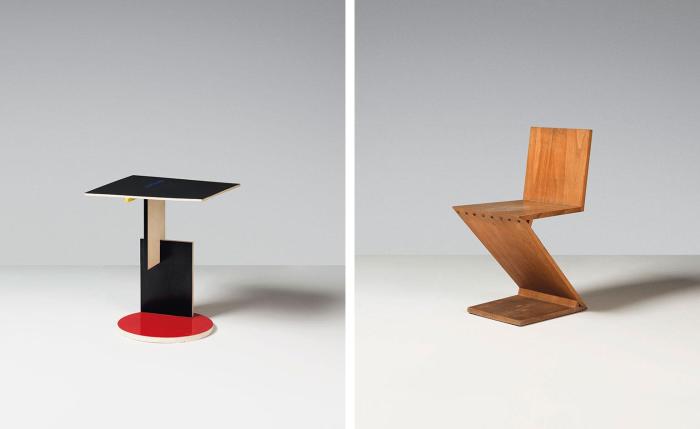
This interactive table light fixture was inspired by the work of famous mid-century designer, Gerrit Rietveld. Each panel is touch-activated and is independent from one another, allowing for endless color possibilities.
Sketch
Process
The making part went pretty smoothly since I’ve used acrylic in a previous project at POD.
Struggles
1. Soldering
Pretty amazing how big of a difference 1mm makes. I initially bought 4mm extra narrow LED strip and it was impossible to solder. The wires kept falling off. I ended up getting a new 5mm strip last minute and it worked much better.
2. Switching from Huzzah back to Uno
Arduino HuzzahArduino Uno
I initially started on the Huzzah board but couldn’t figure out how to sync the LED strip to the sensors, even though the sensors were working. Because I didn’t need internet connectivity anyway, I decided to switch back to Uno.
3. Coding
Coding has always been my weakest skill. After a lot of back and forth, I came across the “buttoncycler” code which I was able to modify and perfected with the help of Becky.
4. Only 2 out of 3 panels work…
In the initial test, all 3 panels work perfectly independently but once assembled, in the first test run, something must have happened because the sensors become not so sensitive anymore and I had to tap repeatedly in different spots for quite a while to trigger the animation.
Edited version
Unedited version
Next Steps
I would love to take apart the two panels that are not working and try to fix them.
I did not anticipate the wires to be so bulky – makes sense since there are 4 from each panel – I would like to try using all white wires for a more refined minimal look.
We’d probably all agree that physical release can be the most satisfying and relieving outlet when stress levels are high or a burst of adrenaline runs through our veins.
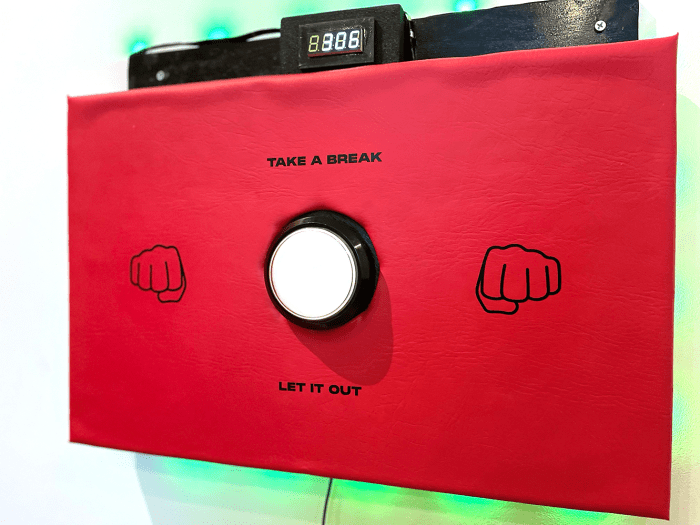
The One Minute Punch Break creates a healthy space for frustrations and pent up emotions, designed to turn tension into release and then a smile. Intended to be mounted on the walls of offices and co-working spaces, the massive button starts a 60-sec LED timer while each punch you make is reflected on the counter.
Is working from home driving you insane? Does your office need an anger zone? Or do you find yourself needing an outlet before a big presentation? You probably need to make yourself one of these…
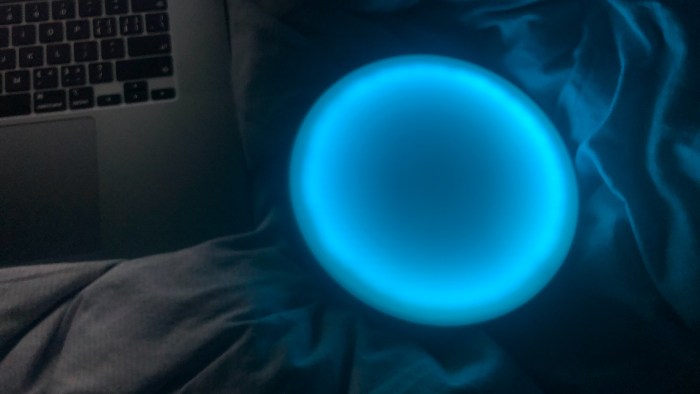
The name Pharus comes from the latin word for Beacon. I chose this because of the characteristics that many of us attribute to that word. A beacon of light is physical, but also emotional and spiritual. By connecting through the internet and effecting each others light, it provides the connection and the sense of safety that a beacon provides, even when you’re far away.
For my final project I sought out to make a nightstand thermostat that shows what the outside temperature is so you can wake up and properly dress for the day. The thermostat shows two different icons, a snowflake for when its cold and a flame for when its hot.
The project started by experimenting with Adafruit’s Dotstar Matrix LEDs, which I had never used before. There were little to no tutorials so the best thing I could do was to start playing with it. I tried a series of codes which helped me understand how the pixel LEDs worked. One of the most tricky things to do was to learn how to connect the matrices and align them to what the code was meant to portray.
After figuring out the right connectivity, I went into experimenting with making icons with the pixels. I learned how to turn on and off individual pixels so I created a chart to manually mark out the pixels I wanted to turn on in order to show what I wanted on the matrices. In order to draw the icons in pixels I used grid-paint.com and continued to manually mark down the individual pixels on my chart.
After the code was done I proceeded to glue the matrices together carefully, in order to have a more accurate display.
Lastly, I 3d modeled a casing for the matrices and arduino uno board. I created a separate lid with holes designed to hold magnets for easy access to the board in case something goes wrong and a hole in the back to slide the power cable through.
After that was done, I proceeded to glue the arduino uno board inside the box, and an acrylic piece on the inside of the lid. The semi translucent acrylic helped diffuse the Dotstar LEDs. The matrices were later glued to the back of the acrylic.
When Everything was in place I connected the matrix to the uno board and closed the lid.
It is normal that school is challenging and, at times, deeply so! But sometimes things really do get out of control, and students, unable to communicate to their teachers and advisors how they are feeling, can fall over the edge. It is at this point–when students are burnt out, sleep deprived, and even physically ill, that the institution notices that it’s time for a change.
We believe this is an issue of feedback delay. What if teachers and academic advisors knew before it is too late, that school life for students is going downhill? What if there was a way to stop the burn out and misery before it happened?
The Concept
User Story BoardUser Story Board
This project is designed to help students track their mood with feedback sent to academic advisors to know how a student cohort is doing on a daily or weekly basis.
The mood tracker is inspired by the notion of checking in on how a group of people are doing using “thumbs” as a visual cue. An upward, side, or downward-pointing thumb signifies a good, ok, or bad emotional state, respectively 👍👎
When a students punch in their mood on the tracker, the tracker tallies up the number of pressed buttons and sends email triggers. For example if 20 “thumbs down” were recorded, the IFTTT APP sends an email alerting the academic advisor of a perilous student status.
Research
The concept of of checking in date back to the 1960’s practice of punching. -in at work.
Our mood tracker bears a core resemblance to the standing satisfaction booths in airport bathrooms and stadiums.
However, our product goes further in that it is not so much an endless vessel for feedback, but an alert system that is triggered at specific moments to help educational institutions and staff know when to check in with their students.
The Neumann study found emotional exhaustion and lack of felt accomplishment are ingredients of the burnout process. Therefore, Emotional fatigue greatly influences student performance and affects personal commitment which makes it important to track and prevent.
Lastly, we use the thumbs similar to the iconic Facebook “LIKE” since it is a familiar concept to a majority of our target audience -Millennials.
To follow detailed steps on how to create the Mood Tracker click here
Process
Preliminary SketchLow Fidelity Model3D Rendering Final Product
Product Video
Product in use
Final Product Shots
PoD Mood Tracker: Vote GoodPoD Mood Tracker: Vote Bad
Future Projections
A mood tracker can be used in settings other than schools. It would be interesting to imagine this product in work settings as well. Lastly, since emotional feelings are alot more complex and subjective to each individual having a detailed database on who clicks what button throughout the week would help understand individual emotions better.
I was so bothered by my kitty that she likes to pee on my bed, I checked everything she needs and I also took her to the vet. After I troubleshot everything I can think and listen to the doctor’s word, I realize she just has some bad behavior. So that’s why I decide to make some device to help to adjust her behavior and make my life easier.
Water Surface is an atmosphere lamp that lights up just like making little waves on the water surface. It can be placed on your table, shelf, or bedside to create a harmonious atmosphere, bringing an absorbing experience to the user.
This idea can also be developed a lot of different water ripple effects. For example, the effect of the water texture will be different with the strength of the touch. Or it can also create an .interference of waves when two people touch it at the same time.
My project’s purpose is to help users to focus and not procrastinate. The form was to make sure that the phone would be out of reach and the construction’s hardest part was the circuit and connecting it to the internet. My future projections are to making it to actually send the text and taking it further to connect a soundboard and making an alarm go off if the sensor detects the phone being taken out.
The learnings I learned through this process is that there are so many different technical difficulties you can run into with various factors that comes from it. This means that you would have to test different factors and must find the right problem to fix. If I were to take this further next time, I hope to make sure I can concisely be able to pin point the problems and be able to fix it on my own and be able to successfully get to my goal.