External Hard Drive Teardown by Manako

2breakdown

It started like this.1original


The small star problem: the star-shaped drills in VFL were all too large for these stars.3small-star-problem


So I drilled through the screws… until the bit broke off.

And used a vise grip unsuccessfully… until Chris gave me his star-shaped screwdrivers. His stars were the perfect size!


The top finally came off!

Then I unscrewed everything I could get my fingers on like this piece.

and these discs.

Then, it was time for the other side.  It became obvious that whoever designed this harddrive really didn’t want me to tear it open.  S/He used 4 different sizes of screws to attach the circuit board to the base board.


But I did it anyway.17a_theotherside2


This side had many films.  Like this one.

And this.

And this.  The black board must not have wanted to touch the green one.  Who can blame it?  The green board is spiky and full of circuits.

Underneath all the pieces, discs and films, the black baseboard showed its very peculiar self.  It had a cylinder that turned on one side, but on the other, remained still.

It looked like the cylinder was riveted in a rotating core.  The lip of its rivet was sticking out of the board.  So I decided to file it away to set the cylinder free.

But filing was not enough to set the cylinder free.  So I drilled through the rivet  (without breaking the bit this time!)

When I set the cylinder free.  It showed me a piece that it had been securing inside: a ring of copper wires that looked electromagnetic.24it-came-off


To take this unexpected treasure off of the board, I hammered through its core, hoping that by removing the core, it would let me take the ring.25hammerit


But no matter how many times I hammered, the core wouldn’t move.  So I dremmeled through the whole board.  26dremmelit


And finally got the ring off!

Tools Used:  Drill, vise grip, screw driver, file, hammer, magnifier, plier, file, drimmel

2 Design Elements:  I love/hated that the designer of this hard drive used so many rivets to connect pieces vertically.  The rivets in the cylindrical core was incredible; there was not even a sliver of space between each piece to let me ply it open.  While they made it frustrating for me to tear everything down, the whole process made me appreciate the precision involved in manufacturing this product.

Also, there was a stark difference between between the two side of the board in terms of protection.  While the side of the circuit protected it by layering multiple films between the circuit and the board, the other side prevented particles from entering the device.  The rubber lining on the cover sealed it onto the board, making it impossible for dust to enter it.  I was surprised that nothing similar was on the circuit side.  Aren’t circuits at risk from dust also?

img_2787


Nintendo DSi Teardown

nintendo-bright-min

The Nintendo DSi was a handheld gaming console released in 2008/2009. Its logic board (C/TWL-CPU-01) carries 3 chips:

  • Samsung KLM5617EFW-B301 for Flash Memory
  • AIC3005 (haven’t found purpose yet)
  • Mitsumi 3317A (haven’t found purpose yet)

labelled-nintendo-01-min

There were a number of screws that the designer had hidden behind plastic casing, so I had a bit of trouble locating them all. To complete the deconstruction, I mostly used a small bit driver, but used a knife/medium screwdriver as wedges to pull pieces of the casing apart.

This might not be much of a surprise to the experienced industrial designers, but the first design element I was interested to discover was that there are pads behind all of the buttons. For some reason I always assumed they were set on springs:

screen-shot-2016-09-14-at-17-41-34

Mostly, though, I wanted to figure out the design and materials behind the making of the touchscreen. I find resistive screens particularly well designed as there is an inherent sense of user feedback to its function. However, I wasn’t expecting to find the several layers of film behind the glass:

screen-shot-2016-09-14-at-17-43-14

I’m sure there are many, many more manufacturing techniques in the process of building the DSi, but the ones I’ve inferred so far are:

  • Plastic casing – Some form of molds are likely used, could be injection or compression molding
  • Printed circuit boards – Very briefly, this includes the steps of copper patterning, etching, lamination, drilling, coating, then soldering/alternate mounting procedures
  • Speakers – A metal die is likely used to cast the frame, and attached to other components (cone, voice coil, copper wires) via gluing
  • Touch screen – A transparent material (the film), a conductive layer, and a cover sheet are adhered, then coated or cased with glass
  • LCD screen – Two glass layers are polished, washed, and coated. A layer of indium tin oxide is evaporated onto the glass, followed the application of a long chain polymer. These components are sealed together using a resin.  Spacers are then put into place, and the screen is filled with a liquid crystal material.

I still remember the excitement surrounding the release of the first of the DS line, the Nintendo DS, back in 2004. Being in high school at the time probably added to the feeling that everyone had one. At the time, the design elements that excited the people around me were the dual screens, touch screen capabilities, and if I remember correctly, the smooth integration of the stylus fitting as though it was just another part of the case.

Today, I’m interested in the designer’s decision to only to include touch for the lower screen and not the upper. Was it a question of frailty (users would push too hard and the hinges would give)? Another reason I can think of is that the designer felt users would only use the touchscreen on the lower face, as pushing down feels better than pushing at an incline.

screen-shot-2016-09-15-at-12-09-30

The second design choice I’m intrigued by is the location of the camera on the central bar (on which the console flips closed). No matter how I picture it, the angle at which it would capture the user seems very awkward! I’d love to know what drove the designer to choose to place the camera there instead of at the top of the upper lid.

dsi-designq2adsi-designq2b

Space shooter Explosion

I walked into a thrift shop and found a Bad-ass looking space shooter.img_20160914_111331

It was pretty easy to tear down the product using bare hands and a screw driver!

teardown

Below is the description of the Part , its material and the manufacturing process.

  1. Outer casing (Top) : made of ABS plastic done by Injection Molding
  2. Shooter Shaft : made out of transparent ABS plastic done by Injection Molding.
  3. Shooter Shaft Lid : made out of ABS plastic and Injection molded
  4. Outer casing (Bottom) : made of ABS plastic done by Injection Molding
  5. LEDs : made out of Glass and semiconductors by glass molding
  6. PCB : made out of Glass, Epoxy and copper through multiple processes
  7. Battery Slot : opener made out of ABS plastic by injection molding.
  8. Plastic disk : made out of ABS plastic by injection molding.
  9. Ceramic Capacitor : made out of ceramic by ceramic molding and baking
  10. Spring : made out of Steel/iron Alloy by coiling
  11. Screws : made out of Stainless Steel by casting, machining and threading
  12. Wire + Battery connector : made out of plastic, copper, aluminium and solder
  13. Trigger Parts : made out of ABS plastic by injection molding.
  14. Housing : made out of ABS plastic by injection molding.
  15. Shooter : made out of foam and press cut
  16. Battery casing : made out of ABS plastic by injection molding.
  17. AA Batteries : multiple process


It was fun doing this activity! Sad I couldn’t put it back, as I stripped down even the last piece of wire!

#sowmyaiyer

Kodak Pocket Video Camera Teardown


1k1a0968


20160914_151532


20160914_151607

PCB had HDMI connector, A/V outlet, DC IN 5V for charging.

20160914_151258


20160914_151249


The product has a very complicated assembly consisting of:componants-01

20160914_151219_1


The Kodak Zx1 was a Pocket Video Camera released in 2009. Its logic board carries multiple chips on PCB:

  • AAT1415 – Advanced Analog Technology (FIVE-CHANNEL DC-DC CONVERTER WITH A 2.5V LDO)
  • Hynix – HY27SF081G2A-FPCB, Part Category: Memory ICs, Manufacturer: SK Hynix, Description: 128MX8 FLASH 1.8V PROM, 30ns, PBGA63
  • Ambarella (A2S30 A2S-A1-RH) – Product Category: IC Chips, Manufacturer: Ambarella, Description: A2S30 A2S-A1-RH Datashee, Package: BGA, Quantity: 609 PCS, Lead Free Status / RoHS Status: Lead free / RoHS Compliant, Moisture Sensitivity Level(MSL): 3(168 Hours
  • Hynix (HY5PS1G1631CFR) – 1Gb DDR2 SDRAM – SK hynix
  • WM  
  • WM8978GEFL/RV Cirrus Logic Audio CODECs STR CODEC w/HP SPKR 32-pin (Sep 2016) Mouser Electronics (Recorder)
  • WM8978GEFL/V Cirrus Logic Audio CODECs Stereo Codec with H/P Spkr (Sep 2016) Mouser Electronics (Speaker)


Untitled-2.jpg


The Tools that I used to take it apart:

  • Small cross head screw driver
  • Leatherman multitool


Apparently, I picked a quite delicately made object. At the first glance, this pocket camera seemed very simple and easy to tear down. I was totally wrong about that and took me quite long time to understand each part. I used simple techniques of delicately unscrewing many cross head screws, and there were many of them even inside of the camera to hold its PCB. I also used multitool to open up its case and detaching the LED monitor screen from the aluminum board. I found that there are yellow plastic cover  between monitor screen and PCB, and it was there for protecting processor chips. I was also very amazed by the size of camera that were placed on the PCB. Perhaps, I should use this camera component for Arduino later.

The size of this pocket camera was just about the size of cigarette case, but it had rounded corner.  I also found that the plastic extorior was coated with rubber material. The designer of the camera must have designed it this way for users to have a better grip, and I like the way it was.

Strobe Teardown

This is a teardown of a rotating strobe light I found at a little dollar store in Greenpoint, Brooklyn. In total, there are 60 individual parts. I took down the entire thing using only my Leatherman Wave multi-tool. I was able to keep all parts intact, with the exception of clipping a few wires. The metal housing required me to pry open the disk and unbend the metal with my flat end and needle nose pliers. Upon taking the object apart, I was surprised to see how many plastic gears went into making it and that the gears came lubricated. It was also interesting to see all the electrical components and the motor were housed neatly in a metal enclosure. I guess they designed it this way to prevent any damage happening to the moving parts.

This slideshow requires JavaScript.

knolled-partsmaterial-listmore-parts


iHome Digital Clock and iPod Player Teardown

Product : iHome IP11B Spacesaver Alarm Clock iPod/iPhone Speaker Dock (Black)

The iP11 is a digital alarm clock and iPod speaker. It has Alarm ON/OFF, iPod Play/Pause, Volume Up and Down, Alarm Set, Hour and Minutes Sleep, Alarm Set and Snooze/Dimmer Buttons on the top. It comes with an AC adapter to convert to DC 10V power. The clock can also run on its own with a 3V CR 2032 battery.

Total time taken for the tear-down : 50 minutes

This slideshow requires JavaScript.

1a
Tools used : Leatherman Wave multi-tool and small screw-drivers set

Step 1 : Remove the two screws at the bottom holding the base.

5

Step 2 : Remove the two screws in the back and unplug the power cable.

7

Step 3 : Remove two screws from the bottom.

8

The two plastic parts of the body should then come apart.

13

Step 4 : Remove the battery cover from the back of the bottom part.

14

Step 5 : Remove these four screws to take apart the iPod dock unit and unplug the wires from the unit. The iPod dock unit itself comes apart by removing two screws in the sub-assembly.

This slideshow requires JavaScript.

Step 6 : Unplug the different cables from the circuit.

This slideshow requires JavaScript.

Step 7 : Remove the two screws holding the keys sub-assembly.

This slideshow requires JavaScript.

Step 8 : Remove the six screws shown below holding the circuit board and the speaker assembly. Also, remove the two screws on the other side holding the speaker assembly. One of the screws on the other side wouldn’t budge, so I had to tear apart the plastic. A small frame holding the display screen will also come apart along with the screen itself. The keypad from the top are sealed with the plastic body so they didn’t come apart. They might have been insert molded along with the plastic body.

This slideshow requires JavaScript.

Step 9 : The grill in front is held in place through a few tabs bent inside. Bend them outside and the pull apart the grill.

This slideshow requires JavaScript.

The bottom assembly is now done.

Step 10 : In the top assembly, remove the nuts and bolts holding the heat sink in place. The heat sink is a bent strip of aluminium.

This slideshow requires JavaScript.

Step 11 : Remove the six screws shown below holding the circuit boards in place. Unplug the connector fixed to the plastic. The bottom part is also done.

This slideshow requires JavaScript.

Step 12 : Remove the four screws take apart the speaker from its housing.

37

Here are all the major components in the device.

38

A few wires holding the top and bottom sub-assembly were soldered on to the boards so I had to cut them to take them apart. Hence, I couldn’t re-assemble the device back together.

Below is a list of the components, their materials and manufacturing processes.

part-numbersbom

Two design elements I found interesting are the cable winding feature between the base and the bottom part and the slight recess of the bottom body from the top surface. This not only gives an edge to hold the product one-handed but it also makes the body disappear from a lot of angles.

Trisonic Torchlight teardown

flashlight_top-downFor this tear-down assignment, I chose to investigate an inexpensive flashlight. For $1.99, I acquired the marvel of modern engineering otherwise known as the Trisonic Torchlight TS-97B-11T.

Here’s the last time it was seen safely in one piece:

flashlight

The first step in disassembly involved unscrewing the front-most black piece, easily done with the handy finger grips in its rubbery plastic surface. This functions as both the gateway to the battery compartment and the joining mechanism for the ‘lens’ components.

lens_componentsOnce unscrewed, the front piece freed the three hard plastic pieces above:

  • lens – clear plastic, used to protect the bulb
  • reflector – grey plastic painted chrome, used to diffuse the bulb’s light
  • ring – red plastic, this ring sits between the front and rest of the battery chassis where they screw together. Its purpose is unclear, but perhaps functions as a washer to avoid stripping/excessive friction in the join. Or it may just be decorative.

Nestled within the reflector was the bulb, which was glued together and impossible to dissect further without shattering the thin plastic exterior.

bulbreflector

Clipping onto the base of of the reflector is this plastic disk, which holds the bulb in place and is presumably the diameter of the chassis interior in order to maintain stability of all pieces within the chassis.

disk.JPG

Beneath the disk is a black plastic cap that screws onto the bottom of the reflector. At the bottom of this cap is a small metal piece that would serve as a conductor between the bottom of the bulb and the batteries below.

pieces_1

At this point, there is no further disassembly to be done with bare hands:

battery_case

Tug as I might with pliers, the metal coil and conductor refused to budge. So it was time to resort to the small hand-saw, part of my multi-tool. Things got much hairier very quickly.

chassis+grip.jpg

The main body of the the flashlight actually consists of an inner and outer layer:

  • chassis – the inner layer and the flashlight’s rigid plastic skeleton, the chassis houses the batteries and electrical components and screws into the lens and bulb apparatus. (It was more fragile than I anticipated, and snapped along the seam when I sawed down to the button.)
  • grip – the ‘skin’ of the body, this more malleable, rubbery plastic makes for a satisfying grip and enables the soft click of the on-off button. (It also clips to the string wristband, which I did not bother cutting off for this exercise.)

Partially damaged by my sawing was the hero of the show, the switch:

button_apparatus

The white plastic switch sits in a crevice between the cup and shaft of the chassis (the weak spot where the chassis snapped), between the chassis and grip. The long metal conductor strip extending from its bottom runs along the exterior of the chassis and folds into the chassis’s interior, clipping around the base of the coil (which is what the batteries sit on at the bottom of the chassis).

pieces_2

Here’s a look at the disassembled switch, which consists of:

  • button – a white plastic cylinder, solid on top and hollow on bottom. The four small nodes extending from its base are perpendicular, and match up with corresponding grooves in the…
  • top – a rounded rectangle plastic case which an elongated aperture at top that snugly houses the button. It clips neatly onto the base, which has the same profile.
  • base – the backing and foundation for the switch, it features pegs that clip into the top, through holes on the conductor strips to hold them in place. it also has a central peg that supports the…
  • spring – the component that provides the persistent resistance that keeps us coming back for more! Atop it sits the…
  • conductor-disk  – this sombrero-shaped metal piece is what connects (or does not connect) the conductor strips when the flashlight is switched on (or off).
  • conductor strip (small) – the smaller of the two strips, this one runs up from the top of the switch, back into the chassis, and interfaces with the top of the battery and bottom of the bulb.

pieces_3


Learnings

I’m still mystified by a few steps in the production process, but I have confidently concluded the following:

  • All plastic pieces were created using molds.
    • Longer circular pieces (reflector, chassis, grip) have bisecting seams, suggesting they were created as two separate pieces and then joined.
    • Shorter circular pieces (front, lens, ring, cap, disk) have no seams, and were likely single-mold productions.
  • My inferred assembly order is as follows:
    • bulb (a unique part created at a separate time, possibly by a third party)
    • switch internal components
    • coil is dropped to the bottom of the chassis
    • switch and conductor strips are placed on outside of chassis; conductor strips are run into the corresponding crevices to the chassis interior
    • grip is folded onto chassis (possibly when its two halves are joined)
    • cap and conductor are joined; bulb is slipped into back of reflector
    • disk is clipped onto back of bulb + reflector
    • cap is screwed onto bottom of reflector, joining the bulb to reflector
    • ring is slipped around neck of chassis; lens is clipped into front
    • front is screwed onto chassis, flashlight is complete

Impressions

I was amazed by the elegant simplicity inside such an inexpensive device. Two general features stood out to me in particular:

texture – The repeating square pyramids along the grip’s handle had just the right about of tack to keep the light firmly in hand, even when held in a variety of positions. Any larger or smaller and they might have become invasive or pointless, but they were the perfect size. Additionally, the decision to comprise the reflector’s convex interior of many flat-faced hexagons, rather than just one smooth surface, was an interesting one. This must help diffuse light in more directions, as a smooth surface would likely have been easier to manufacture.

durability – Cheap things typically break easily, but this flashlight seemed very resilient—even if it couldn’t withstand my saw. Its exterior surface was the perfect mixture of hard and soft to cushion and withstand a sizable drop, and its key component—the switch—was in a well-protected spot, very difficult to remove. It seems $2 still goes a long way, some times

Tear Down: Bluetooth Speaker

Please find a tear down of the Air Zucker wireless, bluetooth speaker below. Enjoy!

speaker-teardown-001
Product Image: Air Zuker, Bluetooth Wireless Speaker

Product Image: Air Zuker, Bluetooth Wireless Speaker

speaker-teardown-002
Progression of tear down

Tear down tools used:

  • Screwdriver to remove screws
  • X-Acto knife to cut glue/adhesives
  • Flat head to pry open joints
speaker-teardown-004
Top down image of all parts

Top down image of all parts.

speaker-teardown-005
Identifying each component’s purpose

Identifying each component’s purpose above.

speaker-teardown-pg-6-fix-001
Identifying Manufacturing Process per Part

Identifying manufacturing process per part above.

speaker-teardown-007
Detailed breakdown of PCB

Detailed breakdown of PCB above.

speaker-teardown-008
Detailed breakdown of Speaker Sub-Assembly

Detailed breakdown of Speaker Sub-Assembly above.

speaker-teardown-p9-001

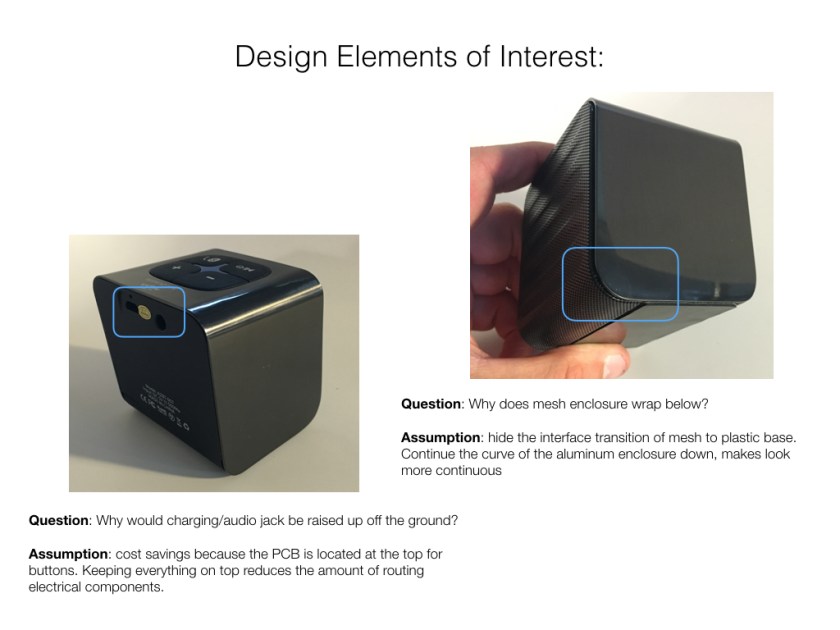
Design elements of interest above with text below.

Location of audio jack and charging port:

Question: Why would charging/audio jack be raised up off the ground?

Assumption: cost savings because the PCB is located at the top for buttons. Keeping everything on top reduces the amount of routing electrical components.

Mesh enclosure design:

Question: Why does mesh enclosure wrap below?

Assumption: hide the interface transition of mesh to plastic base. Continue the curve of the aluminum enclosure down, makes look more continuous

Striping an Electric Pencil Sharpener

SEBASTIAN HARMSEN

This electric sharpener works with electricity directly plugged in. It seemed fairly simple at the beginning. I was not expecting that many pieces and screws. I could not open the battery, I guess they are glued together.

Process

Step 1:

  • Separate all the pieces that do not need unscrewing.
  • You have the pencil sharpener, the trash box and the wall charger.

img_2358Step 2:

  • After separating all the pieces I took out the first 4 screws.
  • The plastic parts where set aside and kept working on disarming the main engine.

Step 3:

  • Remove the entire engine and pencil sharpener mechanical parts from its plastic container.
  • At this point the sharpener still worked when plugged in.

img_2364Step 4:

  • Remove the next 4 screws and separate the engine from its main structure.
  • Inside their where 3 gears that moved consequently from the mains engine gear.

Step 5:

  • Then I proceeded to remove the engine.

img_2370

Step 6:

  • Once the engine was removed, I separated all the gears, screws and plastic parts attached to it.
  • Then I removed the pencil sharpener from the main cabin.

Step 7:

  • Finally I got to the main engine. Took it apart until I could not anymore.
  • It seemed fairly simple, coil and two magnets inside that made the main axis rotate when plugged in.

Step 8:

  • Once completely separated it was time to put it back together, which I did and it was a lot of fun too.

img_2379